Loading
Get 14-om070-00000742783-dteimiumr1414 - Mr1414 - Application - Sa Gov
How it works
-

Open form follow the instructions
-

Easily sign the form with your finger
-

Send filled & signed form or save
How to fill out the 14-OM070-00000742783-DTEIMIUMR1414 - MR1414 - Application - Sa Gov online
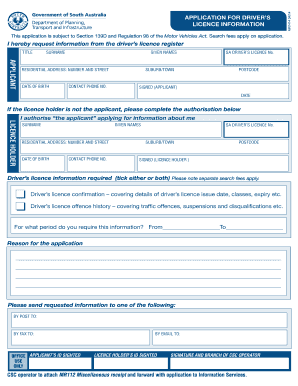
This guide provides clear and detailed instructions on how to complete the 14-OM070-00000742783-DTEIMIUMR1414 - MR1414 - Application for driver’s licence information. It is designed to assist users in filling out the form accurately and efficiently.
Follow the steps to successfully complete your application.
- Click ‘Get Form’ button to obtain the application and open it in the editor.
- Begin by filling in the title section with your appropriate title. Next, enter your surname and given names as they appear on your official documents.
- In the applicant section, provide your residential address by filling in the number and street, suburb/town, and postcode.
- Input your date of birth and contact phone number in the designated fields.
- If you possess a South Australian driver’s licence, enter your driver’s licence number.
- Sign and date the application where indicated to validate your submission.
- If you are not the licence holder, fill out the authorisation section, providing the licence holder's surname, given names, residential address, date of birth, contact phone number, driver’s licence number, suburb/town, and postcode.
- Indicate which driver’s licence information you require by ticking the appropriate boxes for confirmation details or offence history.
- Specify the period for which you require the information by filling in the start and end dates.
- Provide a reason for your application in the space provided, ensuring to give a clear and concise explanation.
- Choose your preferred method of receiving the requested information by providing details for post, fax, or email.
- If required, the CSC operator will sight and record the identification of both the applicant and the licence holder.
- Finally, save your changes, and download, print, or share the completed form as necessary.
Complete your online application today for prompt driver’s licence information.
Driver Licence number appears under 'Licence Number' on the front of the card. Card number is on the back of the card at middle right.
Industry-leading security and compliance
US Legal Forms protects your data by complying with industry-specific security standards.
-
In businnes since 199725+ years providing professional legal documents.
-
Accredited businessGuarantees that a business meets BBB accreditation standards in the US and Canada.
-
Secured by BraintreeValidated Level 1 PCI DSS compliant payment gateway that accepts most major credit and debit card brands from across the globe.