Loading
Get Ics 309 Fillable
How it works
-

Open form follow the instructions
-

Easily sign the form with your finger
-

Send filled & signed form or save
How to fill out the ICS 309 Fillable online
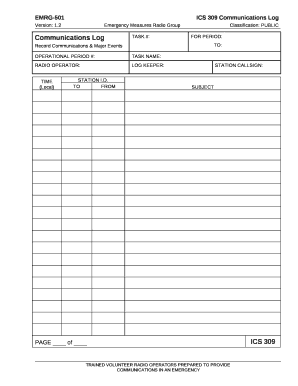
The ICS 309 Fillable is an essential document used for recording communications and major events during emergency operations. This guide will walk you through each section of the form, providing clear instructions to ensure accurate completion.
Follow the steps to effectively fill out the ICS 309 Fillable online.
- Press the ‘Get Form’ button to access the ICS 309 Fillable document and open it in your preferred editing tool.
- In the ‘TASK #’ field, enter the assigned task number. If you are unsure, consult your Net Control Station (NCS) or Operations Manager for guidance.
- Under ‘FOR PERIOD,’ input the starting date and local time for your operational shift.
- In the ‘OPERATIONAL PERIOD #’ section, request the number from your NCS, as this serves to identify your specific shift.
- Fill in the ‘TASK NAME’ with the name of the site where you are operating, such as ‘Nepean Sportsplex Shelter.’
- Provide the name of the radio operator in the ‘RADIO OPERATOR’ field. If there are shared roles, indicate this with a small double arrow between the names.
- Enter the name of the person responsible for documenting the log in the ‘LOG KEEPER’ section, also using a double arrow if shared.
- In the ‘STATION CALLSIGN’ field, input the callsign under which the site is operating, which may be a permanent EMRG callsign or the operator’s callsign.
- For ‘TIME (Local),’ fill in the time of each entry using local time formatted in a 24-hour clock.
- In the ‘STATION I.D.’ box, specify the destination for outgoing messages in the ‘TO’ field, and the source station for incoming messages in the ‘FROM’ field.
- Add your logging information in the instructions portion. Refer to EMRG training course EMRG-407 for detailed guidance on logging.
- On each new page, indicate the page number and the total number of pages at the end of your shift.
- Once you have completed the form, save your changes, and choose to download, print, or share the document as necessary.
Complete your ICS 309 Fillable form online for accurate record-keeping during emergencies.
Related links form
The Incident Objectives (ICS 202) describes the basic incident strategy, incident objectives, command emphasis/priorities, and safety considerations for use during the next operational period.