Loading
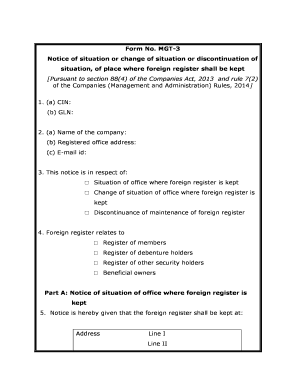
Get Mgt 3
How it works
-

Open form follow the instructions
-

Easily sign the form with your finger
-

Send filled & signed form or save
How to fill out the Mgt 3 online
Filling out the Mgt 3 form is essential for notifying relevant authorities about the situation, change, or discontinuation of the location where the foreign register is maintained. This guide will provide clear, step-by-step instructions to assist you in completing the form accurately.
Follow the steps to effectively complete the Mgt 3 form.
- Press the ‘Get Form’ button to obtain the Mgt 3 form and open it for editing.
- Begin by entering your company identification number (CIN) in section 1(a) and your global location number (GLN) in 1(b). This information is crucial for identifying your company.
- In section 2, provide the name of your company (2(a)), its registered office address (2(b)), and your email id (2(c)). Ensure that the details are accurate to avoid any communication issues.
- Move to section 3 and select the appropriate option regarding the notice you are submitting: whether it is for the situation of the office, change of situation, or discontinuance of maintenance of the foreign register.
- In section 4, specify what the foreign register relates to by choosing from options such as the register of members, debenture holders, other security holders, or beneficial owners.
- If you are submitting a notice of the situation of the foreign register, fill out part A (section 5) with the new address details, including city, district, state, ISO country code, country, and pin code. Provide an email address for further communications.
- For a notice of change of the situation (Part B), complete section 6 with the existing situation details, followed by the purpose for the change in section 7, and the new address in section 8.
- In the case of discontinuance (Part C), provide the existing situation in section 9 along with the reason for discontinuance in section 10. Finally, indicate where the entries are transferred to in section 11.
- Complete the form by entering the date and place of submission, and sign where indicated to validate your submission.
- Review all entered information for accuracy. After confirming that everything is correct, save your changes, and consider downloading, printing, or sharing the completed form as necessary.
Start completing your Mgt 3 form online today!
MGT 18. Managing Diverse Teams (4) The modern workplace includes people different in culture, gender, age, language, religion, education, and more. Students will learn why diverse teams make better decisions and are often integral to the success of organizations.
Industry-leading security and compliance
US Legal Forms protects your data by complying with industry-specific security standards.
-
In businnes since 199725+ years providing professional legal documents.
-
Accredited businessGuarantees that a business meets BBB accreditation standards in the US and Canada.
-
Secured by BraintreeValidated Level 1 PCI DSS compliant payment gateway that accepts most major credit and debit card brands from across the globe.