Loading
Form preview
  • US Legal Forms
  • Other Templates
  • More Forms
  • More Uncategorized Forms
  • Waltham Forest - Walthamforest Gov

Get Waltham Forest - Walthamforest Gov

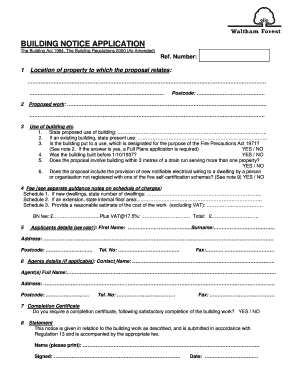
BUILDING NOTICE APPLICATION The Building Act 1984, The Building Regulations 2000 (As Amended) Ref. Number: 1 Location of property to which the proposal relates: .. 2 Postcode: Proposed work:.

How it works

  1. Open form

    Open form follow the instructions

  2. Easily sign form

    Easily sign the form with your finger

  3. Share form

    Send filled & signed form or save

How to fill out the Waltham Forest - Walthamforest Gov online

Filling out the Waltham Forest Building Notice Application form is an important step for individuals planning construction or renovation work. This guide will assist you in completing the form correctly and efficiently, ensuring all necessary information is provided.

Follow the steps to successfully complete the application form.

  1. Click ‘Get Form’ button to access the application form and open it in the designated editor.
  2. In section 1, provide the location of the property related to your proposal. Ensure to fill in the address comprehensively.
  3. For section 2, enter the postcode associated with the property you are referring to.
  4. In section 3, detail the proposed work to be undertaken at the property. Be specific about what type of construction or changes are involved.
  5. Still in section 3, state the proposed use of the building as well as its current use if it is an existing structure.
  6. Answer the questions regarding fire precautions and relevant building regulations. If applicable, respond to the questions with 'YES' or 'NO'.
  7. In section 4, provide details about fees. Specify the number of new dwellings, internal floor area for extensions, and a reasonable estimate of the cost of the work, and calculate the total fee including VAT.
  8. Complete section 5 by entering your personal details, including your first name, surname, address, postcode, and contact information.
  9. If applicable, fill in section 6 with the agent's details, including the contact name, full name, address, postcode, and contact information.
  10. In section 7, indicate if you require a completion certificate upon satisfactory completion of the work by answering 'YES' or 'NO'.
  11. Finish by signing the document in section 8, printing your name, and indicating the date of submission.
  12. Once all fields are completed, ensure to save changes, and you may choose to download, print, or share the completed form.

Complete your Waltham Forest Building Notice Application online today!

Get form

Experience a faster way to fill out and sign forms on the web. Access the most extensive library of templates available.
Get form

Related content

How does local government use the planning system...
We conducted a census of local government areas in England with planning ... London...
Learn more
Tackling Alcohol-related Anti-Social Behaviour in...
Name of OCU/agency/CDRP/CSP: Waltham Forest Safety Net Partnership. Name of one contact...
Learn more
London Borough of Waltham Forest - zxc.wiki
Jun 11, 2020 — Website · www.walthamforest.gov.uk. The London Borough of Waltham Forest...
Learn more

Related links form

Department Of Environmental Health - Public Health Inspection NJ HIV Positive Tracking Form - Njhiv1.org Application For Registration Of Companies And Firms International Mathematics Contest

Questions & Answers

Get answers to your most pressing questions about US Legal Forms API.

Contact support

Outside working hours and at weekends, call Customer Services on 020 8496 3000.

If you wish to contact us regarding the following services, please use the email below: Property licensing, pub licensing or any other types of license, email: Licensing@walthamforest.gov.uk. Market traders or street trading, email: Street.trading@walthamforest.gov.uk.

For telephone enquiries phone 0203 092 0112 and select option three (Monday to Friday 9am to 5pm) Lines are closed on public holidays.

To appeal, please call us on 020 8496 3000 or email us at revenue.services@walthamforest.gov.uk.

Have your card details and Council Tax account reference ready then call 0300 456 0628.

The easiest way to report a non-emergency repair is by: calling the office on 020 8524 6987, or. sending an email to repairs@wfha.org.uk.

If you cannot apply online due to a disability, please contact our Human Resources Transaction Team. You can send them an email to hradmin@walthamforest.gov.uk or call the number on the job advert.

When you are logged into Council Tax Connect: click “Show Details” choose the “Report a Change of Address“ option.

Get This Form Now!

Use professional pre-built templates to fill in and sign documents online faster. Get access to thousands of forms.
Get form
If you believe that this page should be taken down, please follow our DMCA take down processhere.
Get Waltham Forest - Walthamforest Gov
Get form
  • Adoption
  • Bankruptcy
  • Contractors
  • Divorce
  • Home Sales
  • Employment
  • Identity Theft
  • Incorporation
  • Landlord Tenant
  • Living Trust
  • Name Change
  • Personal Planning
  • Small Business
  • Wills & Estates
  • Packages A-Z
  • Affidavits
  • Bankruptcy
  • Bill of Sale
  • Corporate - LLC
  • Divorce
  • Employment
  • Identity Theft
  • Internet Technology
  • Landlord Tenant
  • Living Wills
  • Name Change
  • Power of Attorney
  • Real Estate
  • Small Estates
  • Wills
  • All Forms
  • Forms A-Z
  • Other Templates
  • Legal Hub
  • About Us
  • Help Portal
  • Legal Resources
  • Blog
  • Affiliates
  • Contact Us
  • Delete My Account
  • Site Map
  • Industries
  • Forms in Spanish
  • Localized Forms
  • State-specific Forms
  • Forms Kit
  • Real Estate Handbook
  • All Guides
  • Notarize
  • Incorporation services
  • For Consumers
  • For Small Business
  • For Attorneys
  • USLegal
  • FormsPass
  • pdfFiller
  • signNow
  • altaFlow
  • DocHub
  • Instapage
Form Packages
  • Adoption
  • Bankruptcy
  • Contractors
  • Divorce
  • Home Sales
  • Employment
  • Identity Theft
  • Incorporation
  • Landlord Tenant
  • Living Trust
  • Name Change
  • Personal Planning
  • Small Business
  • Wills & Estates
  • Packages A-Z
Form Categories
  • Affidavits
  • Bankruptcy
  • Bill of Sale
  • Corporate - LLC
  • Divorce
  • Employment
  • Identity Theft
  • Internet Technology
  • Landlord Tenant
  • Living Wills
  • Name Change
  • Power of Attorney
  • Real Estate
  • Small Estates
  • Wills
  • All Forms
  • Forms A-Z
  • Other Templates
Customer Service
  • Legal Hub
  • About Us
  • Help Portal
  • Legal Resources
  • Blog
  • Affiliates
  • Contact Us
  • Delete My Account
  • Site Map
  • Industries
  • Forms in Spanish
  • Localized Forms
  • State-specific Forms
  • Forms Kit
Legal Guides
  • Real Estate Handbook
  • All Guides
Prepared for you
  • Notarize
  • Incorporation services
Our Customers
  • For Consumers
  • For Small Business
  • For Attorneys
Our Sites
  • USLegal
  • FormsPass
  • pdfFiller
  • signNow
  • altaFlow
  • DocHub
  • Instapage
Social Media
Call us now toll free:
+1 833 426 79 33
As seen in:
© Copyright 1999-2026 airSlate Legal Forms, Inc. 17 Station Street, Suite 303, Brookline, MA 02445
  • Your Privacy Choices
  • Terms of Service
  • Privacy Notice
  • Content Takedown Policy
  • Bug Bounty Program