Loading
Get Hra Claim Form - Tri-star Systems
How it works
-

Open form follow the instructions
-

Easily sign the form with your finger
-

Send filled & signed form or save
How to fill out the HRA Claim Form - Tri-Star Systems online
Filling out the HRA Claim Form is an essential step in seeking reimbursement for eligible health expenses. This guide provides a step-by-step approach to ensure a smooth and efficient experience as you complete the form online.
Follow the steps to successfully fill out your HRA Claim Form.
- Click the ‘Get Form’ button to obtain the HRA Claim Form and open it in your preferred editor.
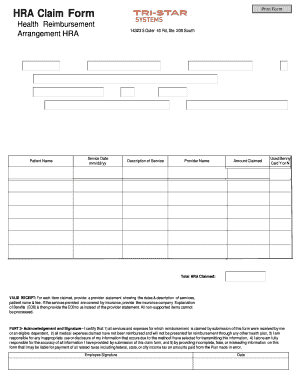
- In Part 1, complete the personal identification section by entering your Social Security Number (SSN), last name, first name, middle initial, address, city, state, zip code, employer name, and email. Ensure all information is accurate to avoid delays.
- Move to Part 2, where you will fill out the Health Reimbursement Arrangement (HRA) details. Input the patient’s name and phone number, date of service in mm/dd/yy format, and a description of the service provided. Make sure to enter the provider's name and the total amount you are claiming.
- Indicate whether a Benny Card was used by selecting 'Y' for yes or 'N' for no. Remember to summarize the total HRA you are claiming at the end of this section.
- Prepare valid receipts for each item you are claiming. This includes a provider statement showing the date of service, description, patient name, and fee. If applicable, provide the insurance company's Explanation of Benefits (EOB) as well.
- In Part 3, read and acknowledge the certification statement. Ensure you are aware of the responsibilities tied to the submission of this claim form, including the accuracy of the information provided.
- Finally, sign and date the form at the bottom to complete your submission. Review every detail to confirm accuracy before saving, downloading, printing, or sharing your completed form.
Take the next step towards reimbursement and fill out your HRA Claim Form online today.
You Cannot Cash Out Your HRA.