Loading
Get Molina Appeal Form
How it works
-

Open form follow the instructions
-

Easily sign the form with your finger
-

Send filled & signed form or save
How to fill out the Molina Appeal Form online
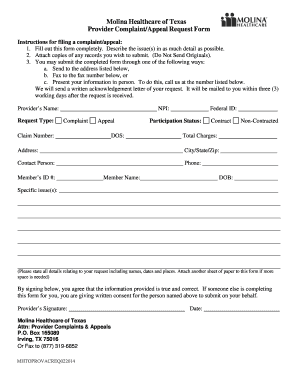
Filling out the Molina Appeal Form is an important step for users seeking to submit a complaint or appeal with Molina Healthcare of Texas. This guide provides clear instructions to help users complete the form accurately and effectively.
Follow the steps to successfully complete the Molina Appeal Form.
- Click ‘Get Form’ button to obtain the form and open it in the editor.
- Begin by filling out the provider's name and identifying the request type, whether it is a complaint or appeal.
- Enter the National Provider Identifier (NPI) and the associated claim number.
- Provide the date of service (DOS) and federal ID. This information is essential for identifying the specific case.
- Indicate the participation status as either 'Contract' or 'Non-Contracted' depending on your situation.
- Detail the total charges related to the issue and fill in the provider's address, including city, state, and zip code.
- Specify a contact person along with their phone number for further communication.
- Input the member's ID number and full name, as well as their date of birth (DOB).
- Clearly describe the specific issue(s) in detail, including any relevant names, dates, and locations. If more space is needed, attach an additional sheet.
- Sign and date the form. If someone is completing the form on behalf of another, ensure that consent is clearly given.
- Once you have completed all sections, save changes, download, print, or share the form as necessary. You may now submit it through the appropriate method.
Complete your documents online now for a smooth submission process.
Healthcare.gov is the health insurance marketplace operated by the federal government. It launched in 2013 as part of the Affordable Care Act. The marketplace allows you compare and apply for private health insurance policies.