Loading
Get Trade Single Window Client Registration Application
How it works
-

Open form follow the instructions
-

Easily sign the form with your finger
-

Send filled & signed form or save
How to fill out the Trade Single Window Client Registration Application online
Filling out the Trade Single Window Client Registration Application online is a crucial step for individuals and organizations in New Zealand wishing to engage in international trade. This guide provides detailed, step-by-step instructions to ensure a smooth registration process.
Follow the steps to successfully complete the online application.
- Click ‘Get Form’ button to obtain the form and open it in the editor.
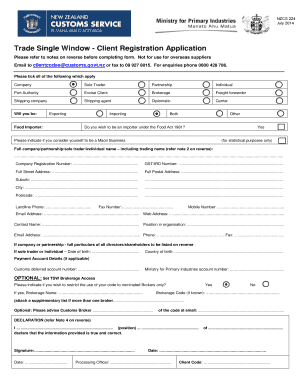
- Identify your entity type by ticking the appropriate box. Options include company, sole trader, partnership, individual, port authority, excise client, brokerage, freight forwarder, shipping company, shipping agent, diplomatic carrier, or other.
- Select whether you will be exporting, importing, both, or if you are a food importer. If applicable, respond to the inquiry regarding if you wish to be an importer under the Food Act 1981.
- Provide your full company, partnership, sole trader, or individual name, including the trading name if it differs from the registered name. Ensure to include the company registration number and GST/IRD number.
- Fill in your full street address and postal address, including suburb, city, and postcode.
- Enter your contact details, including landline phone, fax number, mobile number, and email address. Include your web address if applicable.
- Provide the contact person's name and their position in the organization, along with their contact information.
- If applying as a company or partnership, list full particulars of all directors/shareholders on the designated section of the form, including name and date of birth.
- Complete the optional payment account details section if applicable, entering your customs deferred account number or Ministry for Primary Industries account number.
- Indicate if you wish to set TSW brokerage access by specifying the brokerage name and code if known. If more than one broker applies, attach a supplementary list.
- Complete the declaration section by providing your name, position, and signing the application, including the date.
- Before finalizing, review all entries for accuracy and completeness to avoid rejection. Then, submit your form with all required attachments to the designated email or fax number provided.
- Save changes, download, print, or share the filled application as needed.
Complete your registration today by filling out the Trade Single Window Client Registration Application online.
Trade Single Window (TSW) is an electronic channel for the cargo and excise industries to submit information to and receive responses from border agencies (Customs, Ministry for Primary industries, Maritime NZ and Ministry of Health). TSW allows border agencies to use shared information to process craft and cargo data.