Loading
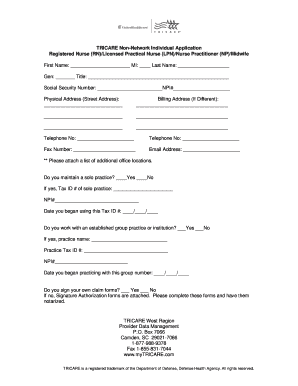
Get Tricare Non-network Individual Application
How it works
-

Open form follow the instructions
-

Easily sign the form with your finger
-

Send filled & signed form or save
How to fill out the TRICARE Non-Network Individual Application online
Filling out the TRICARE Non-Network Individual Application online can be a straightforward process with the right guidance. This guide will walk you through each section of the form, ensuring that you provide all necessary information accurately.
Follow the steps to complete your TRICARE Non-Network Individual Application online.
- Click the ‘Get Form’ button to obtain the application form and open it in your chosen document editor.
- Begin by entering your first name, middle initial (if applicable), and last name in the designated fields. Make sure the spelling is accurate as this information is crucial for your application.
- Next, fill in your gender and title. Ensure that all information reflects your current credentials.
- Provide your Social Security Number and NPI (National Provider Identifier) number. This information is necessary for identification purposes.
- Complete your physical address, including street address, city, state, and ZIP code. If your billing address differs from your physical address, fill in that section as well.
- Input your telephone numbers and fax number, ensuring correct formatting for each. Your email address should also be noted for communication purposes.
- If you maintain a solo practice, indicate 'Yes' or 'No' and, if applicable, provide your Tax ID number and the date you began using it.
- In case you work with an established group practice or institution, provide the practice name, Tax ID number, and the date you began working with them.
- Indicate whether you sign your own claim forms. If you do not, ensure that you complete the attached Signature Authorization forms and get them notarized.
- If applicable, fill in the sections related to your RN or LPN license information, including license number, original issue date, and expiration date. Attach a copy of your state license.
- For Nurse Practitioners and Midwives, provide the necessary license and certification information and again attach the corresponding state license.
- Finalize your application by reviewing all provided information for accuracy. Once complete, save changes to your document, and choose to download, print, or share the application as needed.
Begin filling out your TRICARE Non-Network Individual Application online today for a seamless application experience.
It can take HNFS 60 to 90 days to credential a new provider once all completed information is received based upon the accuracy of the information provided.