Loading
Get Business Credit Application For Net 30 Day Terms - Teacherdirect
How it works
-

Open form follow the instructions
-

Easily sign the form with your finger
-

Send filled & signed form or save
How to fill out the Business Credit Application For Net 30 Day Terms - TeacherDirect online
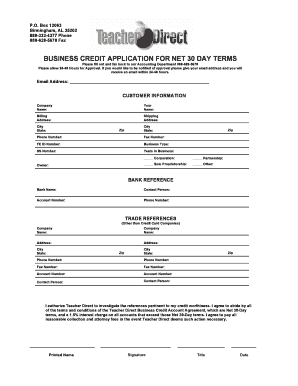
Filling out the Business Credit Application for Net 30 Day Terms with TeacherDirect is a crucial step in securing credit for your business needs. This guide provides clear instructions to help users complete the application accurately and efficiently online.
Follow the steps to complete your application with ease.
- Click ‘Get Form’ button to access the Business Credit Application and open it in your preferred online editor.
- Begin by entering your company's name in the 'Company Name' field. Make sure to provide the official name under which your business operates.
- In the 'Your Name' field, input your full name. This identifies you as the primary contact for the application.
- Fill in the 'Billing Address' with the location where your business receives its bills. This is important for account correspondence.
- Provide the 'Shipping Address' if it differs from the billing address. Use the fields for city, state, and zip code to complete this section.
- Enter your business's main 'Phone Number' and 'Fax Number' to facilitate communication.
- Specify your 'FE ID Number' which is essential for tax identification purposes.
- Indicate your 'Business Type' by selecting the appropriate option (Corporation, Partnership, Sole Proprietorship, or Other). Fill in the 'SS Number' if applicable.
- State the number of 'Years in Business'. This gives insight into your business's establishment.
- List the owner's name in the designated field for clarity on ownership.
- For the 'Bank Reference', input details such as 'Bank Name', 'Contact Person', 'Account Number', and 'Phone Number'. This information aids in validating your application.
- When entering 'Trade References', provide two companies that are not credit card companies along with their addresses, city, state, zip, phone numbers, fax numbers, account numbers, and contact persons.
- Review the authorization section where you agree to allow TeacherDirect to verify your creditworthiness.
- Affix your 'Printed Name', 'Signature', 'Title', and 'Date' to finalize the application.
- After completing the form, you can save your changes, download a copy, print it for your records, or share it as needed.
Complete your Business Credit Application online today to take the next step in your business’s growth and reliability.