Loading
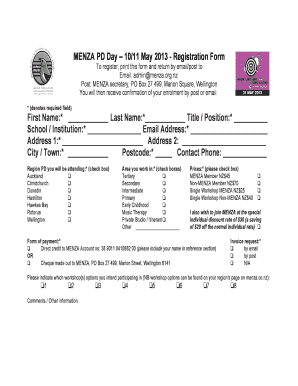
Get Registration Form Pdf. - Menza - Menza Co
How it works
-

Open form follow the instructions
-

Easily sign the form with your finger
-

Send filled & signed form or save
How to fill out the Registration Form PDF - MENZA - Menza Co online
Filling out the Registration Form PDF for MENZA is an important step to secure your participation in the professional development day. This guide will provide you with clear instructions on how to complete each section of the form proficiently.
Follow the steps to complete your registration effectively.
- Press the ‘Get Form’ button to acquire the Registration Form PDF and open it in the form editor.
- Begin by filling out the required fields: First Name, Last Name, and Title/Position. Ensure all details are entered accurately as this information will be used for your registration confirmation.
- Provide your School/Institution and Email Address. Make sure that your email address is correct to receive any updates regarding your enrolment.
- Complete your Address, including Address 1, Address 2, City/Town, and Postcode. This information is necessary for any postal correspondence.
- Enter your Contact Phone number. This will allow the organization to reach you if there are any issues with your registration.
- Select the Region PD you will be attending by checking the appropriate box next to your chosen location.
- Mark the Area you work in by checking the applicable boxes. You may select multiple options if relevant.
- Indicate your preferred Price by checking the corresponding box that reflects your membership status.
- If you wish to join MENZA at the special discount rate, check the box provided. This option provides savings for new members.
- Specify your Form of Payment by checking either the option for Direct Credit or Cheque, as well as providing relevant details.
- Indicate your preference for an Invoice request by selecting the appropriate method.
- Please indicate which workshop options you intend to participate in by checking the relevant boxes from the listed workshop options.
- Use the Comments/Other Information section to provide any additional notes or requirements you may have.
- After completing the form, review all entries for accuracy. You can then save the changes, download a copy of the form, print it, or share it as needed.
Complete your registration online to secure your spot!
Industry-leading security and compliance
US Legal Forms protects your data by complying with industry-specific security standards.
-
In businnes since 199725+ years providing professional legal documents.
-
Accredited businessGuarantees that a business meets BBB accreditation standards in the US and Canada.
-
Secured by BraintreeValidated Level 1 PCI DSS compliant payment gateway that accepts most major credit and debit card brands from across the globe.