Loading
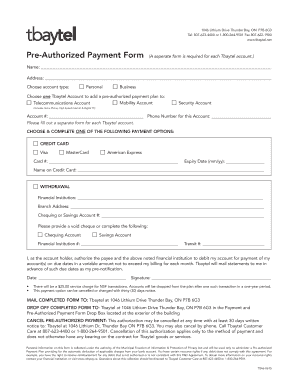
Get Pre-authorized Payment Form - Tbaytel
How it works
-

Open form follow the instructions
-

Easily sign the form with your finger
-

Send filled & signed form or save
How to fill out the Pre-Authorized Payment Form - Tbaytel online
Filling out the Pre-Authorized Payment Form for Tbaytel online is a straightforward process. This guide will assist you in completing each section of the form accurately, ensuring a smooth setup for your payment plan.
Follow the steps to complete your Tbaytel pre-authorized payment form online.
- Press the ‘Get Form’ button to access the Pre-Authorized Payment Form and open it for editing.
- Begin by entering your name in the designated field to identify yourself as the account holder.
- Fill in your address to ensure accurate correspondence regarding your payment plan.
- Select your account type by checking either 'Personal' or 'Business' to specify the nature of your Tbaytel account.
- Choose one Tbaytel account to link to your pre-authorized payment plan by checking the corresponding box: Mobility Account, Security Account, or Telecommunications Account.
- Provide your account number and the phone number associated with that account to ensure proper processing.
- Select your preferred payment option by checking either 'Credit Card' or 'Withdrawal' based on your payment method.
- If you choose 'Credit Card', enter the card number, expiry date, and the cardholder's name. If selecting 'Withdrawal', fill in the name of your financial institution, branch address, and account number.
- Indicate whether you are providing a void cheque or completing the account type for chequeing or savings, and fill in necessary financial institution and transit numbers.
- Sign and date the form to authorize Tbaytel to debit your account for payments on due dates.
- Review all entered information for accuracy before finalizing the form.
- Once completed, save your changes. You may then download, print, or share the form as needed.
Start completing your Tbaytel Pre-Authorized Payment Form online today!
A Pre-Authorized Payment (PAP) allows you to arrange automatic monthly payments from your TD Credit Card Account to pay a regularly recurring bill from a merchant.