Loading
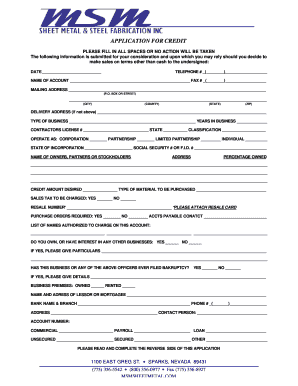
Get Application For Credit 2 - Msm Sheet Metal
How it works
-

Open form follow the instructions
-

Easily sign the form with your finger
-

Send filled & signed form or save
How to fill out the APPLICATION FOR CREDIT 2 - MSM Sheet Metal online
Completing the APPLICATION FOR CREDIT 2 - MSM Sheet Metal online can streamline your credit request process and ensure accuracy in your submission. This guide provides a clear, step-by-step approach to filling out the form, ensuring that all necessary information is included for consideration.
Follow the steps to fill out the APPLICATION FOR CREDIT 2 - MSM Sheet Metal online.
- Click the ‘Get Form’ button to retrieve the APPLICATION FOR CREDIT 2 - MSM Sheet Metal. This will open the form for you to complete online.
- Fill in the date at the top of the form, ensuring that you provide the current date to validate your application.
- Enter your primary telephone number in the designated field, making sure to include the area code for accurate contact.
- Provide the name of the account holder in the specified section, which is essential for identifying your credit application.
- Complete the mailing address fields with your organization’s mailing information. Ensure that you include a P.O. Box or street address, along with city, county, state, and ZIP code.
- If your delivery address differs from your mailing address, fill in the delivery address fields accordingly.
- Specify the type of business you operate and indicate the number of years in business to give context to your application.
- Input your contractor's license number along with the state of issuance and classification type.
- Select your business structure by marking the appropriate checkbox - Corporation, Partnership, Limited Partnership, or Individual.
- Complete the state of incorporation and either your Social Security Number or Federal Identification Number, as required.
- List the names, addresses, and ownership percentages of all owners, partners, or stockholders involved in the business.
- Indicate the desired credit amount and specify the type of materials to be purchased using the credit.
- Answer whether sales tax should be charged by marking the respective checkbox for yes or no.
- If applicable, enter your resale number and remember to attach the resale card as instructed.
- Indicate whether purchase orders are required by marking the checkbox accordingly.
- Provide the name and contact information of the accounts payable contact person within your organization.
- List the names of individuals authorized to charge on this account, ensuring accuracy for transaction processing.
- Indicate whether you have interests in any other businesses, providing details where necessary.
- Respond to the bankruptcy question, and if applicable, provide details in the space provided.
- Specify if your business premises are owned or rented, and include the name and address of the lessor or mortgagee.
- Fill in the bank name, branch, phone number, and contact person to verify your banking relationship.
- Complete the account numbers for commercial, payroll, loan, unsecured, secured, and other accounts, where relevant.
- Ensure that you read and complete any additional information requested on the reverse side of the application, if applicable.
- Review all the entered information for accuracy, then proceed to save your changes, download the completed form, print it, or share it, as your needs dictate.
Complete your APPLICATION FOR CREDIT 2 - MSM Sheet Metal online now to facilitate your credit approval process.