Loading
Form preview
  • US Legal Forms
  • Form Library
  • More Forms
  • More Uncategorized Forms
  • Penn Shoulder Score

Get Penn Shoulder Score

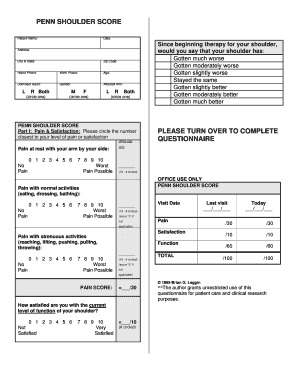
PENN SHOULDER SCORE Patient Name: Date: Address: City & State: Zip Code: Home Phone: Work Phone: Age: Dominant Hand: Gender: Affected Arm: L R Both (circle one) M F L (circle one) R Both (circle.

How it works

  1. Open form

    Open form follow the instructions

  2. Easily sign form

    Easily sign the form with your finger

  3. Share form

    Send filled & signed form or save

How to fill out the Penn Shoulder Score online

The Penn Shoulder Score is a valuable tool used to assess shoulder function and pain levels. This guide will provide you with step-by-step instructions to complete the form online, ensuring an accurate representation of your current condition.

Follow the steps to fill out the Penn Shoulder Score effectively.

  1. Press the ‘Get Form’ button to obtain the Penn Shoulder Score form and open it in the online editor.
  2. Begin by filling out your personal information at the top of the form, including your name, date, address, city and state, zip code, home phone, work phone, age, dominant hand, gender, and affected arm. Be sure to circle the appropriate options where indicated.
  3. In Part I, provide your pain and satisfaction levels. Circle the number that corresponds to your level of pain at rest, pain with normal activities, and pain with strenuous activities. It is important to carefully consider what each number represents in terms of your pain.
  4. Also in Part I, indicate your satisfaction with your current level of shoulder function by circling the corresponding number. This section aims to quantify your subjective experience.
  5. Continue to Part II where you will assess your functional abilities. For each activity listed, circle the number that best describes your level of difficulty performing that activity. Use a scoring of 0 for no difficulty, to 3 for unable to perform.
  6. After filling out Parts I and II, calculate your scores as indicated in the scoring sections of the form for both pain and function.
  7. Once all fields are completed and scores calculated, save your changes. You may choose to download, print, or share the completed form as needed.

Complete the Penn Shoulder Score online to better understand your shoulder health.

Get form

Experience a faster way to fill out and sign forms on the web. Access the most extensive library of templates available.
Get form

Related content

The Penn shoulder score: reliability and validity...
Background: Shoulder outcome measures are used to assess patient self-report levels of...
Learn more
Translation and cultural adaptation of the Penn...
original Article Translation and cultural adaptation of the Penn Shoulder Score to...
Learn more
Wilt Chamberlain - Wikipedia
Wilton Norman Chamberlain was an American professional basketball player who played as a...
Learn more

Related links form

Supply And Delivery Of HB Meter Analyzer - Kemsa.co.ke TENDER NOTICE - Cabinet.gov.pk Complementary And Supplementary Angles Crossword Happy Hearts Plus Application With Physician's Referral Form

Questions & Answers

Get answers to your most pressing questions about US Legal Forms API.

Contact support

Method of Use. The patient is instructed to choose the number that best describes their level of pain and extent of difficulty using the involved shoulder. The pain scale is summed up to a total of 50 while the disability scale sums up to 80. The total SPADI score is expressed as a percentage.

The ASES score contains a physician-rated and patient-rated section; however, only the pain visual analog scale (VAS) and 10 functional questions are typically used to tabulate the reported ASES score. The total score - 100 maximum points - is weighted 50% for pain and 50% for function.

All are based on a 10-point numeric rating scale with end points of ''no pain'' and ''worst possible pain. '' Points are awarded for each item by subtracting the number circled from the maximum of 10. Therefore, a patient is awarded 30 points for complete absence of pain.

The Oxford Shoulder Score (OSS) The Oxford Shoulder Score (OSS) is a 12-item patient-reported PRO specifically designed and developed for assessing outcomes of shoulder surgery e.g. for assessing the impact on patients' quality of life of degenerative conditions such as arthritis and rotator cuff problems.

The Constant-Murley score (CMS) is a 100-points scale composed of a number of individual parameters. These parameters define the level of pain and the ability to carry out the normal daily activities of the patient.

A SANE score requires the patient to rate their knee function on a scale of 0 to 100. ... The definition has varied over time and is often reported as a change that is meaningful to the patient or the smallest difference in a score that is considered to be worthwhile or important.

Get This Form Now!

Use professional pre-built templates to fill in and sign documents online faster. Get access to thousands of forms.
Get form
If you believe that this page should be taken down, please follow our DMCA take down processhere.

Industry-leading security and compliance

US Legal Forms protects your data by complying with industry-specific security standards.
  • In businnes since 1997
    25+ years providing professional legal documents.
  • Accredited business
    Guarantees that a business meets BBB accreditation standards in the US and Canada.
  • Secured by Braintree
    Validated Level 1 PCI DSS compliant payment gateway that accepts most major credit and debit card brands from across the globe.
Get Penn Shoulder Score
Get form
  • Adoption
  • Bankruptcy
  • Contractors
  • Divorce
  • Home Sales
  • Employment
  • Identity Theft
  • Incorporation
  • Landlord Tenant
  • Living Trust
  • Name Change
  • Personal Planning
  • Small Business
  • Wills & Estates
  • Packages A-Z
  • Affidavits
  • Bankruptcy
  • Bill of Sale
  • Corporate - LLC
  • Divorce
  • Employment
  • Identity Theft
  • Internet Technology
  • Landlord Tenant
  • Living Wills
  • Name Change
  • Power of Attorney
  • Real Estate
  • Small Estates
  • Wills
  • All Forms
  • Forms A-Z
  • Form Library
  • Legal Hub
  • About Us
  • Help Portal
  • Legal Resources
  • Blog
  • Affiliates
  • Contact Us
  • Delete My Account
  • Site Map
  • Industries
  • Forms in Spanish
  • Localized Forms
  • State-specific Forms
  • Forms Kit
  • Real Estate Handbook
  • All Guides
  • Notarize
  • Incorporation services
  • For Consumers
  • For Small Business
  • For Attorneys
  • USLegal
  • FormsPass
  • pdfFiller
  • signNow
  • altaFlow
  • DocHub
  • Instapage
Form Packages
  • Adoption
  • Bankruptcy
  • Contractors
  • Divorce
  • Home Sales
  • Employment
  • Identity Theft
  • Incorporation
  • Landlord Tenant
  • Living Trust
  • Name Change
  • Personal Planning
  • Small Business
  • Wills & Estates
  • Packages A-Z
Form Categories
  • Affidavits
  • Bankruptcy
  • Bill of Sale
  • Corporate - LLC
  • Divorce
  • Employment
  • Identity Theft
  • Internet Technology
  • Landlord Tenant
  • Living Wills
  • Name Change
  • Power of Attorney
  • Real Estate
  • Small Estates
  • Wills
  • All Forms
  • Forms A-Z
  • Form Library
Customer Service
  • Legal Hub
  • About Us
  • Help Portal
  • Legal Resources
  • Blog
  • Affiliates
  • Contact Us
  • Delete My Account
  • Site Map
  • Industries
  • Forms in Spanish
  • Localized Forms
  • State-specific Forms
  • Forms Kit
Legal Guides
  • Real Estate Handbook
  • All Guides
Prepared for you
  • Notarize
  • Incorporation services
Our Customers
  • For Consumers
  • For Small Business
  • For Attorneys
Our Sites
  • USLegal
  • FormsPass
  • pdfFiller
  • signNow
  • altaFlow
  • DocHub
  • Instapage
Social Media
Call us now toll free:
+1 833 426 79 33
As seen in:
© Copyright 1999-2026 airSlate Legal Forms, Inc. 3720 Flowood Dr, Flowood, Mississippi 39232
  • Your Privacy Choices
  • Terms of Service
  • Privacy Notice
  • Content Takedown Policy
  • Bug Bounty Program