Loading
Get Speedpass - Imperial Oil
How it works
-

Open form follow the instructions
-

Easily sign the form with your finger
-

Send filled & signed form or save
How to fill out the Speedpass - Imperial Oil online
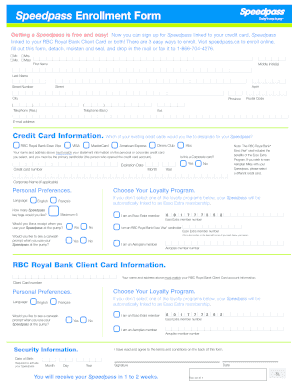
Filling out the Speedpass - Imperial Oil enrollment form online is a straightforward process that allows users to sign up for a free service linked to their credit card or RBC Royal Bank Client Card. This guide will provide clear, step-by-step instructions to simplify your enrollment experience.
Follow the steps to successfully complete your Speedpass enrollment form.
- Click ‘Get Form’ button to obtain the form and access it in the editor.
- Begin by entering your personal information. Specify your title (Mr., Ms., Mrs., Miss), and input your first name, middle initial(s), and last name in the respective fields. Provide your street number, street name, apartment number (if applicable), city, province, postal code, and both residential and business telephone numbers including extensions.
- Next, choose your preferred credit card. Select the credit card type you wish to link to your Speedpass by checking the appropriate box (RBC Royal Bank Esso Visa, VISA, MasterCard, Diners Club, or American Express). Ensure that the name and address match the statement information of the selected credit card.
- Input your credit card information, including the credit card number and the expiration date, specifying the month and year.
- Indicate whether you are using a corporate card by selecting ‘Yes’ or ‘No.’ If applicable, provide the corporate name.
- Choose your loyalty program preferences. You may opt for the default Esso Extra membership or select a different loyalty program by checking the appropriate box. Make sure to select your language preference (English or Français).
- Specify the number of Speedpass key tags you would like, with a maximum limit of five. Indicate whether you want to receive a receipt with your Speedpass use at the pump, and provide your Esso Extra member number if relevant.
- Complete the RBC Royal Bank Client Card section, ensuring that all details match your account information, including the client card number and checking your preferred loyalty links.
- Enter your security information, including your date of birth (month, day, and year), which is required to activate your Speedpass.
- Finally, review all information provided for accuracy. Date the form and provide your signature at the designated line. You will receive your Speedpass in 1 to 2 weeks.
Start your enrollment process now by completing the Speedpass enrollment form online!
Is the Speedpass+ app the same as the Speedpass™ key tag? The Speedpass+ app and the Speedpass key tag are two separate programs. The Speedpass+ app allows customers to pay for Synergy fuel using a smartphone, while the Speedpass key tag is a “touchless” payment device using a physical key tag to pay for Synergy fuel.
Industry-leading security and compliance
US Legal Forms protects your data by complying with industry-specific security standards.
-
In businnes since 199725+ years providing professional legal documents.
-
Accredited businessGuarantees that a business meets BBB accreditation standards in the US and Canada.
-
Secured by BraintreeValidated Level 1 PCI DSS compliant payment gateway that accepts most major credit and debit card brands from across the globe.