Loading
Get Masshealth Mco Enteral Form
How it works
-

Open form follow the instructions
-

Easily sign the form with your finger
-

Send filled & signed form or save
How to fill out the Masshealth Mco Enteral Form online
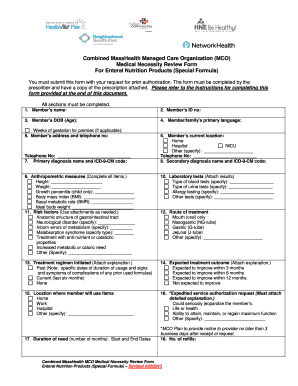
Filling out the Masshealth Mco Enteral Form is essential for securing prior authorization for enteral nutrition products. This guide will walk you through the necessary steps to complete the form accurately and effectively, ensuring you can submit your request confidently.
Follow the steps to effectively fill out the Masshealth Mco Enteral Form online.
- Press the ‘Get Form’ button to access the Masshealth Mco Enteral Form and open it in your preferred online editor.
- Begin filling out the form by entering the member’s name as it appears on the MCO Plan card.
- Input the member’s MCO ID number, found next to the member’s name on the card.
- Provide the member’s date of birth and age, including the weeks of gestation if applicable for premature infants.
- State the member/family’s primary language to flag any translation or interpreter needs.
- Fill in the member’s permanent legal address and a contact telephone number.
- Indicate the member’s current location by checking the appropriate option.
- Enter the primary diagnosis name and the corresponding ICD-9-CM code.
- If applicable, fill in the secondary diagnosis and the relevant ICD-9-CM codes.
- Complete the anthropometric measures including height, weight, growth percentile, body mass index, basal metabolic rate, and ideal body weight.
- Check the relevant laboratory tests and specify types while attaching test results.
- Identify and specify any relevant risk factors associated with the member's nutritional needs.
- Select the primary method of treatment administration from the options provided.
- Outline any previous treatment regimens initiated and attach explanations as needed.
- Indicate expected treatment outcomes with relevant attachments.
- Specify the location where the member will use the enteral products.
- If requesting expedited service authorization, check the corresponding reason and provide a detailed explanation.
- Enter the duration of need for the products, specifying the number of months and the start and end dates.
- Complete the section for the number of refills requested.
- List the enteral formula and required supplies, including HCPCS codes.
- Document the volume/fluid ounces needed per day and corresponding calorie information.
- Indicate the quantity of products requested per month.
- Specify the type of formula requested.
- Provide details of the DME provider including company name and contact information.
- Enter details about the prescriber, including contact information.
- If applicable, include the name of the person completing the form on behalf of the prescriber, their title, organization, and contact information.
- The prescriber must sign the attestation confirming the accuracy of the provided information.
- Once completed, review the form for accuracy and save your changes; you may then download, print, or share the form as needed.
Complete your Masshealth Mco Enteral Form online today to ensure your request for enteral nutrition is submitted promptly.
Get form
Experience a faster way to fill out and sign forms on the web. Access the most extensive library of templates available.
Get This Form Now!
Use professional pre-built templates to fill in and sign documents online faster. Get access to thousands of forms.