Loading
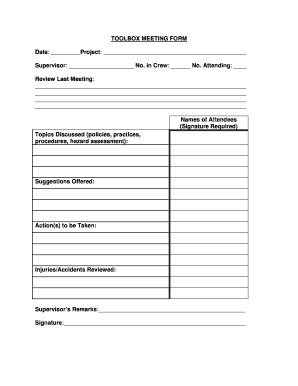
Get Toolbox Meeting Form Date: Project
How it works
-

Open form follow the instructions
-

Easily sign the form with your finger
-

Send filled & signed form or save
How to use or fill out the TOOLBOX MEETING FORM Date: Project online
Filling out the TOOLBOX MEETING FORM is essential for documenting important information regarding safety meetings held within a project. This guide provides comprehensive instructions on each component of the form to ensure clarity and accuracy when completing it online.
Follow the steps to effectively complete the form.
- Click ‘Get Form’ button to obtain the form and open it in the editing interface.
- Fill in the 'Date' section with the relevant meeting date. This should reflect the day the toolbox meeting is conducted.
- Enter the project name in the 'Project' field. Be specific to ensure clarity on which project the meeting pertains to.
- Complete the 'Supervisor' field with the name of the individual facilitating the meeting. This allows for accountability in communication.
- Input the 'No. in Crew' field with the total number of crew members present at the meeting. Then, specify the 'No. Attending' to record those who were present.
- In the 'Review Last Meeting' section, summarize key points discussed in the previous meeting. Highlight any significant updates or unresolved issues.
- List the 'Names of Attendees' in the designated area. Each individual must provide their signature to acknowledge attendance.
- Document 'Topics Discussed' which may include policies, practices, procedures, and any hazard assessments reviewed during the meeting.
- In the 'Suggestions Offered' section, record any recommendations made by attendees for improving safety or operations.
- Outline any 'Action(s) to be Taken' based on the discussions. This should include who is responsible for each action.
- Note any 'Injuries/Accidents Reviewed' during the meeting, if applicable, to keep a record of safety incidents.
- Conclude with the 'Supervisor’s Remarks' to summarize the meeting and provide any final thoughts or reminders.
- Lastly, sign the form in the 'Signature' section to validate the meeting. Ensure all necessary signatures are obtained.
- Once all fields are completed, save your changes, and utilize the options to download, print, or share the form as required.
Complete your toolbox meeting forms online to enhance safety communication and record-keeping.
Keep it short. ... Focus on one topic relevant to the work being done that day. Get workers involved by asking questions or having them demonstrate safe work practices. Be sure to cover changes to the site or working conditions. Have employees inspect tools, equipment, and PPE.