Loading
Get Continuing Education Tracker Template
How it works
-

Open form follow the instructions
-

Easily sign the form with your finger
-

Send filled & signed form or save
How to fill out the Continuing Education Tracker Template online
This guide provides clear and supportive instructions on completing the Continuing Education Tracker Template online. By following these steps, users can efficiently track their continuing education activities and ensure compliance with the necessary requirements.
Follow the steps to successfully complete your continuing education tracker template
- Press the ‘Get Form’ button to access the form and open it in your online editor.
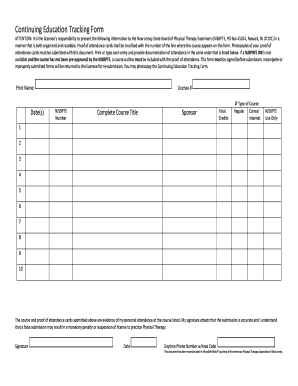
- Begin filling out your personal information in the designated fields. This includes entering your printed name and NJSBPTE number. Make sure these are accurate as they are essential for identification.
- Enter the date(s) of each course attended. You will have multiple fields at your disposal; use all relevant fields to document each date clearly.
- Complete the section for license number. This ensures the board recognizes your submission as linked to your professional credentials.
- For each course, fill in the complete course title as listed on your proof of attendance. This should match exactly to provide accurate records.
- Indicate the type of course for each entry, selecting options such as regular, correspondence, or internet-based education.
- After entering all required course information, ensure that you attach photocopies of your proof of attendance cards closely associated with each course listed.
- Finally, review the form for completeness. All fields must be filled appropriately before you can sign the form. Sign and date it, confirming the accuracy of your entries.
- Once you are satisfied with all information, proceed to save changes, download the document, print it, or share it as the next step in submission.
Begin completing your continuing education tracker template online today for a smoother submission process.