Loading
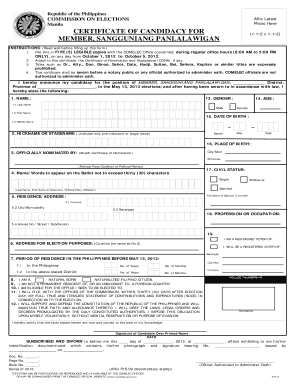
Get Member
How it works
-

Open form follow the instructions
-

Easily sign the form with your finger
-

Send filled & signed form or save
How to fill out the MEMBER online
This guide provides comprehensive instructions on how to complete the MEMBER form for candidacy in the Sangguniang Panlalawigan. By following these steps, users can ensure that they fill out the form accurately and efficiently.
Follow the steps to successfully complete the MEMBER form.
- Press the ‘Get Form’ button to acquire the MEMBER form and open it in the designated editor.
- Affix your latest photo in the designated space provided at the top of the form. Ensure it meets the specified dimensions (1-1/2 x 1-1/2).
- Fill out the district and province where you are announcing your candidacy. Specify your position as 'Member, Sangguniang Panlalawigan.'
- Enter your name in the provided fields: last name, first name, and middle name. Make sure all names are spelled correctly.
- Provide your nickname or stage name, ensuring that only one is indicated.
- Indicate the name of your political party or coalition that officially nominated you. Attach the Certificate of Nomination if applicable.
- Enter your complete address, including house number, street, subdivision, province, city or municipality, and barangay.
- Fill in the address for election purposes, which can be the same as your residential address.
- Indicate the period of residence in the Philippines before May 13, 2013, specifying the number of years and months in both the Philippines and the stated district.
- Tick the appropriate box to declare whether you are a natural born or naturalized Filipino citizen.
- Confirm that you are not a permanent resident or immigrant to a foreign country.
- Confirm your eligibility for the office you are seeking.
- Acknowledge your commitment to file a full, true, and itemized statement of contributions and expenditures within thirty days after the election.
- Affirm your dedication to supporting and defending the Constitution and obeying all lawful orders.
- Affix your thumbprint and signature above your printed name as a declaration that all stated information is correct.
- Ensure the form is sworn before a notary public or an authorized official. Do not forget to document the notary's information.
- Complete the form by protecting your document. Save changes, and consider downloading, printing, or sharing as needed.
Take the next step in the process by completing your documents online today.
: a body part or organ: such as. a. : limb. b. : .
Industry-leading security and compliance
US Legal Forms protects your data by complying with industry-specific security standards.
-
In businnes since 199725+ years providing professional legal documents.
-
Accredited businessGuarantees that a business meets BBB accreditation standards in the US and Canada.
-
Secured by BraintreeValidated Level 1 PCI DSS compliant payment gateway that accepts most major credit and debit card brands from across the globe.