Loading
Form preview
  • US Legal Forms
  • Other Templates
  • More Forms
  • More Uncategorized Forms
  • Bordereau De Recettes - Front Page Sabam

Get Bordereau De Recettes - Front Page Sabam

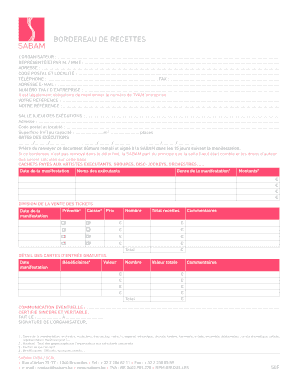
BORDEREAU DE RECETTES LORGANISATEUR : ...................................................................................................................................................................................... REPRSENT(E).

How it works

  1. Open form

    Open form follow the instructions

  2. Easily sign form

    Easily sign the form with your finger

  3. Share form

    Send filled & signed form or save

How to fill out the BORDEREAU DE RECETTES - Front Page Sabam online

The BORDEREAU DE RECETTES is an essential document for reporting event revenues to SABAM. This guide provides clear, step-by-step instructions on how to fill out each section of the form online, ensuring users can complete it accurately and efficiently.

Follow the steps to fill out the form accurately.

  1. Click the ‘Get Form’ button to obtain the form and open it in your chosen editor for online filling.
  2. Begin by entering the details of the organizer in the designated field. This includes the name of the organization, the representative's name (M. / Mme), and their address, including postal code and location.
  3. Next, provide contact information, including a phone number, fax number, and email address. Ensure all details are correct, as this information may be used for follow-up.
  4. Fill out the tax number or business number in the required field, as this is a legal requirement. Remember to include your reference number as well as SABAM’s reference number if applicable.
  5. Enter the venue details where the event took place. This includes the location's name, address, postal code, and locality, as well as the area in square meters or seating capacity.
  6. Provide the dates of the events in the specified format. Make sure to list all relevant dates accurately.
  7. Next, detail the payments made to the performers, groups, disc jockeys, and orchestras. Enter each date of the event, specify the type of event, name the performers, and input the amounts paid.
  8. Indicate the distribution of ticket sales. For each event, document the pre-sale ticket counts and cash sales, checking appropriate boxes for categories, and enter the respective prices.
  9. Outline details of free entry tickets by specifying the event date, beneficiaries, value, number of tickets, and total value. Include any additional comments if necessary.
  10. You will need to confirm any communication regarding the event in the indicated space. Ensure that every field has been checked for accuracy.
  11. Finally, sign and date the document at the bottom to certify the information is accurate. Review all entries before saving changes.
  12. Once completed, you can save changes, download the document, print it, or share it as required.

Complete your BORDEREAU DE RECETTES form online now to ensure timely submission!

Get form

Experience a faster way to fill out and sign forms on the web. Access the most extensive library of templates available.
Get form

Related links form

Trend Lines And Fibonacci Charts How To Read And Manage Potential Profit Rich Finegan Yourbenefitsportal Net Bonuscash Trucash Com Activate Fa2 Form

Get This Form Now!

Use professional pre-built templates to fill in and sign documents online faster. Get access to thousands of forms.
Get form
If you believe that this page should be taken down, please follow our DMCA take down processhere.
Get BORDEREAU DE RECETTES - Front Page Sabam
Get form
  • Adoption
  • Bankruptcy
  • Contractors
  • Divorce
  • Home Sales
  • Employment
  • Identity Theft
  • Incorporation
  • Landlord Tenant
  • Living Trust
  • Name Change
  • Personal Planning
  • Small Business
  • Wills & Estates
  • Packages A-Z
  • Affidavits
  • Bankruptcy
  • Bill of Sale
  • Corporate - LLC
  • Divorce
  • Employment
  • Identity Theft
  • Internet Technology
  • Landlord Tenant
  • Living Wills
  • Name Change
  • Power of Attorney
  • Real Estate
  • Small Estates
  • Wills
  • All Forms
  • Forms A-Z
  • Other Templates
  • Legal Hub
  • About Us
  • Help Portal
  • Legal Resources
  • Blog
  • Affiliates
  • Contact Us
  • Delete My Account
  • Site Map
  • Industries
  • Forms in Spanish
  • Localized Forms
  • State-specific Forms
  • Forms Kit
  • Real Estate Handbook
  • All Guides
  • Notarize
  • Incorporation services
  • For Consumers
  • For Small Business
  • For Attorneys
  • USLegal
  • FormsPass
  • pdfFiller
  • signNow
  • altaFlow
  • DocHub
  • Instapage
Form Packages
  • Adoption
  • Bankruptcy
  • Contractors
  • Divorce
  • Home Sales
  • Employment
  • Identity Theft
  • Incorporation
  • Landlord Tenant
  • Living Trust
  • Name Change
  • Personal Planning
  • Small Business
  • Wills & Estates
  • Packages A-Z
Form Categories
  • Affidavits
  • Bankruptcy
  • Bill of Sale
  • Corporate - LLC
  • Divorce
  • Employment
  • Identity Theft
  • Internet Technology
  • Landlord Tenant
  • Living Wills
  • Name Change
  • Power of Attorney
  • Real Estate
  • Small Estates
  • Wills
  • All Forms
  • Forms A-Z
  • Other Templates
Customer Service
  • Legal Hub
  • About Us
  • Help Portal
  • Legal Resources
  • Blog
  • Affiliates
  • Contact Us
  • Delete My Account
  • Site Map
  • Industries
  • Forms in Spanish
  • Localized Forms
  • State-specific Forms
  • Forms Kit
Legal Guides
  • Real Estate Handbook
  • All Guides
Prepared for you
  • Notarize
  • Incorporation services
Our Customers
  • For Consumers
  • For Small Business
  • For Attorneys
Our Sites
  • USLegal
  • FormsPass
  • pdfFiller
  • signNow
  • altaFlow
  • DocHub
  • Instapage
Social Media
Call us now toll free:
+1 833 426 79 33
As seen in:
© Copyright 1999-2026 airSlate Legal Forms, Inc. 17 Station Street, Ste. 203, Brookline, MA 02445
  • Your Privacy Choices
  • Terms of Service
  • Privacy Notice
  • Content Takedown Policy
  • Bug Bounty Program