Loading
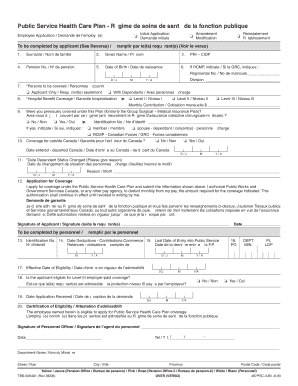
Get Pshcp Employee Application.indd - Public Service Health Care Plan - Pshcp
How it works
-

Open form follow the instructions
-

Easily sign the form with your finger
-

Send filled & signed form or save
How to fill out the PSHCP Employee Application.indd - Public Service Health Care Plan - Pshcp online
Filling out the PSHCP Employee Application is an essential process for accessing health care benefits provided by the Government of Canada. This guide will walk you through each section of the application form, ensuring you have the necessary information to complete it accurately and efficiently.
Follow the steps to accurately fill out your application form.
- Click the ‘Get Form’ button to obtain the application form and open it for editing online.
- Begin by providing your surname in the first field labeled 'Surname'. This is required to uniquely identify you.
- In the 'Given Name' field, enter your first name as it appears on official documents.
- Input your Personal Reference Identifier (PRI) in the designated field for identification purposes.
- Fill in your Pension Number if applicable, ensuring that the number is accurate to avoid delays.
- Enter your date of birth in the specified format. This information helps verify your eligibility for the plan.
- If you are a member of the RCMP, indicate your Regimental Number in the provided field.
- Specify your division by entering the appropriate information in the 'Division' field.
- Indicate whether you are applying for 'Applicant Only' coverage or 'With Dependants' by checking the corresponding box.
- Select your preferred level of Hospital Benefit Coverage (Level I, II, or III) by checking the appropriate box.
- If you have been covered under this plan previously, answer the question and provide your identification number if applicable.
- Complete the 'Coverage for outside Canada' section if you intend to seek medical services outside of Canada.
- If there are any changes to your dependant status, record the date and provide a reason in the relevant section.
- Read and authorize the statement regarding your application for coverage, and provide your signature and date.
- If required, personnel will complete the section designated for them, including the identification number and effective date of eligibility.
- Once all fields are completed, review your information for accuracy.
- You can now save your changes, download your completed form, print it for physical submission, or share it as required.
Complete your PSHCP Employee Application form online to ensure your health care coverage is processed efficiently.
Health care premiums This includes payments made to the Public Service Health Care Plan (PSHCP), which is considered a private plan and not provincial or territorial. Health care premiums paid by your employer not by you are not eligible.
Industry-leading security and compliance
US Legal Forms protects your data by complying with industry-specific security standards.
-
In businnes since 199725+ years providing professional legal documents.
-
Accredited businessGuarantees that a business meets BBB accreditation standards in the US and Canada.
-
Secured by BraintreeValidated Level 1 PCI DSS compliant payment gateway that accepts most major credit and debit card brands from across the globe.