Loading
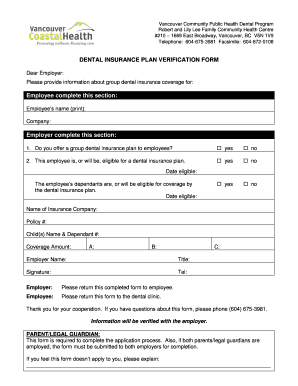
Get Dental Insurance Verification Form
How it works
-

Open form follow the instructions
-

Easily sign the form with your finger
-

Send filled & signed form or save
How to fill out the Dental Insurance Verification Form online
Completing the Dental Insurance Verification Form online is a straightforward process that ensures your dental insurance coverage information is accurately submitted. This guide provides clear steps to help you navigate through each section of the form with ease.
Follow the steps to effectively complete the form online:
- Click ‘Get Form’ button to obtain the form and open it in the editor.
- In the section labeled 'Employee complete this section,' print your full name and the name of your company.
- The employer should then respond to the question regarding whether they offer a group dental insurance plan to employees by selecting 'yes' or 'no.'
- Next, the employer must indicate if you are, or will be, eligible for the dental insurance plan by selecting the appropriate response.
- For the date of eligibility, enter the date that you become eligible for coverage.
- Provide information regarding the employee’s dependents including names and dependent numbers, if applicable.
- The employer needs to fill in the name of the insurance company and the policy number.
- Lastly, in the 'Coverage Amount' section, provide the coverage amounts labeled A, B, and C as applicable.
- The employer should complete their section by signing with their name, title, phone number, and company name.
- Once completed, ensure the form is returned to the employee who will then submit it to the dental clinic for processing.
Start filling out your Dental Insurance Verification Form online now for efficient and accurate processing.
Insurance Verification Checklist Insurance name, phone number, and claims address. Insurance ID and group number. Name of insured, as it isn't always the patient. Relationship of the insured to the patient.