Loading
Get Chrysler Generic Customer Claim Form - Ncds - Home - Ncdsusa
How it works
-

Open form follow the instructions
-

Easily sign the form with your finger
-

Send filled & signed form or save
How to fill out the Chrysler Generic Customer Claim Form - NCDS - Home - Ncdsusa online
Filling out the Chrysler Generic Customer Claim Form can be straightforward if you follow the right steps. This guide provides clear instructions on how to complete the form online, ensuring that you provide all necessary information accurately and effectively.
Follow the steps to complete your claim form online.
- Click ‘Get Form’ button to obtain the form and open it in the editor.
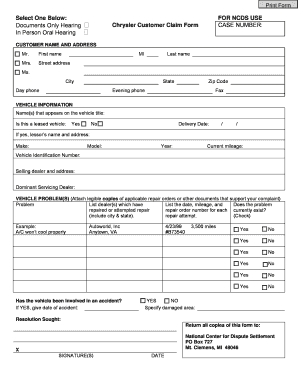
- Begin by entering your customer name and address details in the designated fields. Provide your first name, middle initial, and last name, along with your complete street address, city, state, and ZIP code. Ensure that your contact numbers, both day and evening, are listed accurately.
- In the vehicle information section, fill in the name(s) appearing on the vehicle title. Indicate whether the vehicle is leased by selecting 'Yes' or 'No'. If applicable, include the lessor’s name and address.
- List details about your vehicle such as make, model, year, current mileage, and the Vehicle Identification Number (VIN). Additionally, provide the selling dealer’s information and the dominant servicing dealer.
- Detail the vehicle problem(s) by listing each issue clearly. Attach legible copies of any relevant repair orders or documents that support your complaint. Document any dealers that have attempted repairs, with dates, mileage, and repair order numbers for each attempt.
- Specify whether the problem currently exists by checking the appropriate box. Additionally, indicate if the vehicle has been involved in an accident and provide the date if applicable, along with the specific damaged area.
- In the resolution sought section, express what you would like as a resolution regarding your claim. This helps the review process.
- Finally, sign and date the form to certify that all information provided is accurate. Ensure you retain copies of the completed form and any attachments.
- Once you have completed all sections, save your changes, download, print, or share the form as needed.
Take the next step in managing your claim efficiently – complete your form online today!