Loading
Get Registration Form - Dounby Surgery
How it works
-

Open form follow the instructions
-

Easily sign the form with your finger
-

Send filled & signed form or save
How to fill out the Registration Form - Dounby Surgery online
Filling out the Registration Form for Dounby Surgery is a straightforward process that requires you to provide essential personal information, medical history, and consent for organ donation if desired. This guide will walk you through each section of the form to ensure all necessary details are completed accurately.
Follow the steps to complete the Registration Form online.
- Press the ‘Get Form’ button to access the Registration Form - Dounby Surgery and open it in your chosen editing tool.
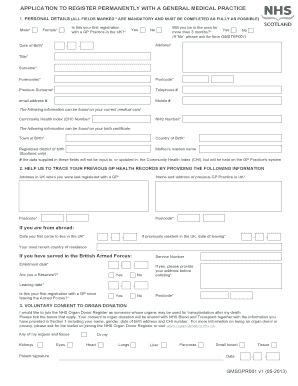
- Begin by entering your personal details. Fill in the required fields marked with an asterisk (*), which include gender, date of birth, and address. Ensure that your email and phone numbers are accurate for communication purposes.
- Indicate whether this is your first registration with a GP Practice in the UK and whether you will be in the area for more than three months.
- Provide information from your current medical card, including your Community Health Index (CHI) Number and NHS Number. If you were born outside of the UK, include your town and country of birth.
- If applicable, fill in the details regarding your previous GP’s practice, including the address and postcode. If you have served in the British Armed Forces, provide enlistment and leaving dates, and indicate if you are a reservist.
- In the consent section, check any boxes that apply if you wish to register as an organ donor. Make sure to include your signature and the date.
- Review the information in the Patient Declaration section for accuracy, sign the form, and date it. If someone else is filling out the form on your behalf, include their name and relationship to you.
- Once all fields are completed and verified for accuracy, save the document. You can then download, print, or share the Registration Form as needed.
Take the next step towards your health management by completing the Registration Form online today.
Industry-leading security and compliance
US Legal Forms protects your data by complying with industry-specific security standards.
-
In businnes since 199725+ years providing professional legal documents.
-
Accredited businessGuarantees that a business meets BBB accreditation standards in the US and Canada.
-
Secured by BraintreeValidated Level 1 PCI DSS compliant payment gateway that accepts most major credit and debit card brands from across the globe.