Loading
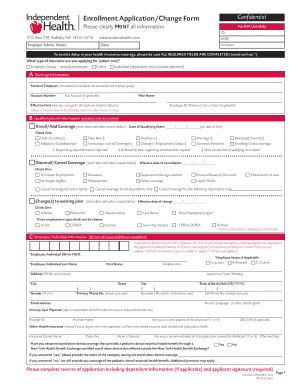
Get Enrollment Application/change Form Confidential - Ymcabuffaloniagara
How it works
-

Open form follow the instructions
-

Easily sign the form with your finger
-

Send filled & signed form or save
How to fill out the Enrollment Application/Change Form Confidential - Ymcabuffaloniagara online
Filling out the Enrollment Application/Change Form Confidential - Ymcabuffaloniagara online is an essential process for users to ensure their health insurance coverage is properly established or modified. This guide provides clear, step-by-step instructions to help you complete the form accurately and efficiently.
Follow the steps to successfully complete the Enrollment Application/Change Form.
- Click ‘Get Form’ button to obtain the form and open it in your preferred editor.
- Review the form's introduction and ensure you understand the purpose of each section before proceeding.
- Complete the fields in Section A, titled 'Coverage Information.' Be sure to provide your employer's name if applicable, account number, plan name, and the effective date of coverage. Double-check that all required fields marked with an asterisk (*) are filled out.
- Move to Section B, 'Qualifying Event Information.' Depending on your circumstances, select the appropriate option for enrolling or canceling coverage. Fill in the corresponding dates and reasons as needed.
- In Section C, 'Employee/Individual Information,' fill in your personal details. Ensure you provide the Social Security Number or Health Insurance Claim Number, name, date of birth, and other requested information. Remember that both primary and secondary phone numbers and the primary language are essential.
- Continue entering information for any dependents listed on the form. Ensure that you provide required details for each dependent, including their relationship to you, their Social Security Number or Health Insurance Claim Number, date of birth, and primary care physician information.
- Upon completing the form, review all the information to confirm its accuracy. Once you are satisfied that all sections are properly filled, prepare to sign and date the certification and consent section.
- Finally, save your changes, and select the option to download or print the completed form for your records. If needed, share the form with your employer or relevant entities.
Begin filling out your Enrollment Application/Change Form Confidential online today to ensure you have the necessary health coverage.
Please use the form below to submit your question to YMCA Buffalo Niagara. You can also call us at (716) 565-6000 during normal business hours.