Loading
Get Other - Affinityplan
How it works
-

Open form follow the instructions
-

Easily sign the form with your finger
-

Send filled & signed form or save
How to fill out the Other - Affinityplan online
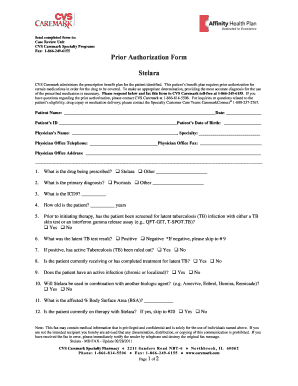
Filling out the Other - Affinityplan form online can be a straightforward process when you follow the right steps. This guide will help you navigate each section of the form to ensure accurate submission for prior authorization.
Follow the steps to complete the Other - Affinityplan form online.
- Click the ‘Get Form’ button to obtain the form and open it in your editing tool.
- Begin filling in the patient information at the top of the form, including the patient name, date, patient ID, and date of birth. Ensure all information is accurate.
- In the physician's section, provide the physician's name, specialty, office telephone, fax number, and physical address.
- Proceed to the prescription details. Indicate the drug being prescribed by selecting or specifying another medication.
- Answer the primary diagnosis by selecting the appropriate option, such as Psoriasis or another diagnosis.
- Fill in the ICD9 code for the diagnosis if applicable.
- Indicate the patient's age in years.
- Respond to the latent tuberculosis screening question by selecting yes or no, then provide the test result.
- If the latent TB test is positive, indicate whether active TB has been ruled out.
- Answer whether the patient is currently under treatment for latent TB, has an active infection, or will be using in combination with another biologic agent.
- Provide the affected body surface area percentage.
- State if the patient is currently on therapy with .
- If applicable, specify the affected areas of the body and answer questions related to the patient's previous therapies and daily activity disruptions.
- Finally, if applicable, answer follow-up questions required only if the patient is currently on therapy.
- Once all fields are complete, review the information for accuracy, sign the form electronically if needed, and save changes. You can then download, print, or share the completed form as necessary.
Complete your documents online to ensure timely processing.
Affinity: In immunology, the strength of binding interaction between antigen and antibody molecules.
Industry-leading security and compliance
US Legal Forms protects your data by complying with industry-specific security standards.
-
In businnes since 199725+ years providing professional legal documents.
-
Accredited businessGuarantees that a business meets BBB accreditation standards in the US and Canada.
-
Secured by BraintreeValidated Level 1 PCI DSS compliant payment gateway that accepts most major credit and debit card brands from across the globe.