Loading
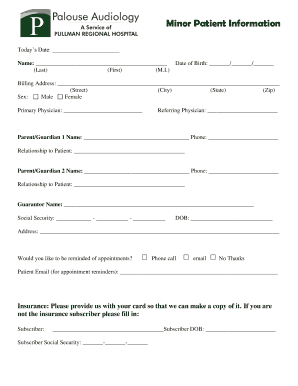
Get Patient Information Sheet - Pullman Regional Hospital
How it works
-

Open form follow the instructions
-

Easily sign the form with your finger
-

Send filled & signed form or save
How to fill out the Patient Information Sheet - Pullman Regional Hospital online
Filling out the Patient Information Sheet is an essential step in receiving care at Pullman Regional Hospital. This guide provides straightforward, step-by-step instructions to help you complete the form online with confidence.
Follow the steps to complete your Patient Information Sheet online.
- Click ‘Get Form’ button to obtain the form and open it in the editor.
- Enter today's date at the top of the form. This helps to create a record of when the information was provided.
- Fill in your name by typing your last name, first name, and middle initial in the designated fields.
- Provide your date of birth in the format MM/DD/YYYY to ensure accurate identification.
- Complete your billing address by including your street address, city, state, and zip code. This information is necessary for billing purposes.
- Select your sex by marking the appropriate checkbox for 'Male' or 'Female'. This information is required for medical records.
- Write down the names of your primary and referring physicians to facilitate communication regarding your care.
- List the names and contact information of your parent(s)/guardian(s) in the respective fields. Indicate their relationship to you as the patient.
- Identify the guarantor’s name, social security number, and date of birth. Ensure that you provide the correct address for the guarantor.
- Choose your preferred method for appointment reminders by selecting either 'Phone call', 'Email', or 'No Thanks'.
- If applicable, provide the patient's email address for appointment reminders.
- Provide your insurance information. Indicate if you are not the insurance subscriber by filling in the subscriber's information as required.
- Read the consent section carefully. Confirm your understanding by signing the form where indicated, ensuring you also date your signature.
- After filling out the form, review all entered information for accuracy. Save changes to the form when finished.
- Download, print, or share the completed form as needed, ensuring that you have copies for your records.
Complete your Patient Information Sheet online today to ensure a smooth admission process.
A medical chart is a complete record of a patient's key clinical data and medical history, such as demographics, vital signs, diagnoses, medications, treatment plans, progress notes, problems, immunization dates, allergies, radiology images, and laboratory and test results.