Loading
Get Vodafone Infodok 236 Form
How it works
-

Open form follow the instructions
-

Easily sign the form with your finger
-

Send filled & signed form or save
How to fill out the Vodafone Infodok 236 Form online
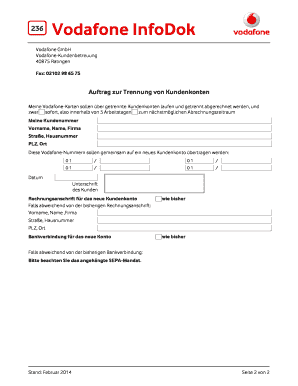
This guide provides clear and supportive instructions on completing the Vodafone Infodok 236 Form online. By following these steps, users can successfully separate their Vodafone accounts for individualized billing.
Follow the steps to complete the form online.
- Press the ‘Get Form’ button to access the Vodafone Infodok 236 Form and open it in your preferred editor.
- Begin filling out the form by entering your customer number at the designated field.
- Provide your first name, last name, and company name, if applicable, in the corresponding fields.
- Fill in your street address and house number, followed by your postal code (PLZ) and city (Ort).
- List the Vodafone numbers that you would like to transfer to a new customer account in the provided fields. Ensure accuracy in the numbers you enter.
- Select the desired date for the account separation and provide your signature at the last field of this section.
- If your billing address differs from the previous one, fill in the new billing address in the respective fields, including your name, street, postal code, and city.
- If you wish to change your bank details for the new account, provide the updated information or check if the current details remain the same.
- Review all entered information for accuracy before proceeding. Ensure you have signed where necessary.
- Once completed, save your changes. You can then download, print, or share the form as needed.
Complete your documents online today to manage your Vodafone accounts effectively.