Loading
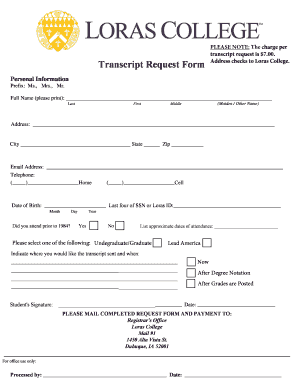
Get Date Territory Program Start Term Orig Enroll Student Type - Loras
How it works
-

Open form follow the instructions
-

Easily sign the form with your finger
-

Send filled & signed form or save
How to use or fill out the Date Territory Program Start Term Orig Enroll Student Type - Loras online
Filling out the Date Territory Program Start Term Orig Enroll Student Type - Loras form online is a straightforward process designed to help individuals efficiently manage their enrollment needs. This guide will walk you through each section of the form to ensure you provide the necessary information accurately.
Follow the steps to complete your form smoothly.
- Press the ‘Get Form’ button to access the document and open it in your preferred online editing tool.
- Begin by entering your personal information. Fill out your full name as it appears on official documents, including any maiden or other names.
- Provide your current address, including your city, state, and zip code, to ensure correspondence can reach you without issue.
- Fill in your email address and telephone numbers, ensuring that you include both home and cell numbers for effective communication.
- Input your date of birth and the last four digits of your Social Security Number or your Loras ID number as identification.
- Indicate whether you attended classes prior to 1984 by selecting 'Yes' or 'No'.
- If applicable, specify the approximate dates of your attendance to assist with record tracking.
- Select either 'Undergraduate' or 'Graduate' to categorize your study type.
- Indicate the destination for your transcript by providing the address where it should be sent, especially if it is to be sent at a specific time (now, after grades are posted, or after degree notation).
- Sign the form with your name and include the date of submission.
- Review all entered information for accuracy. Once confirmed, save the changes made to your form.
- Finally, you can download, print, or share the completed form as needed.
Complete your form online today to manage your educational documents efficiently!
Loras College Rankings Loras College is ranked #10 out of 86 Regional Colleges Midwest. Schools are ranked ing to their performance across a set of widely accepted indicators of excellence. Read more about how we rank schools.