Loading
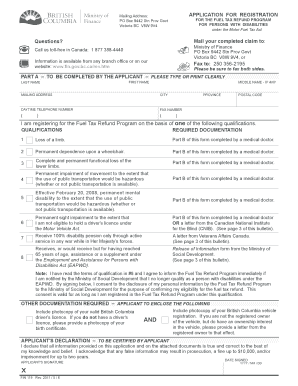
Get Bulletin Mft 004 - Fuel Tax Refund Program For Persons With Disabilities. Persons With Disabilities
How it works
-

Open form follow the instructions
-

Easily sign the form with your finger
-

Send filled & signed form or save
How to fill out the Bulletin MFT 004 - Fuel Tax Refund Program for Persons With Disabilities online
This guide provides clear and comprehensive instructions on filling out the Bulletin MFT 004 - Fuel Tax Refund Program for Persons With Disabilities. Designed to assist individuals with disabilities, this form allows users to apply for a refund of the provincial fuel tax paid on fuel used in their vehicles.
Follow the steps to successfully complete your application online.
- Press the 'Get Form' button to acquire the form and open it in the editor.
- Complete Part A of the Application for Registration for the Fuel Tax Refund Program for Persons With Disabilities form. Fill out your personal information, including your last name, first name, mailing address, telephone number, and check the qualifying criteria that applies to you.
- Ensure to include the required documentation as indicated on the form. This may include a photocopy of your valid British Columbia driver's license or birth certificate, and vehicle registration.
- If applicable, have a medical doctor complete Part B of the form, certifying your disability. Make sure they sign and date the certification.
- Once you have filled out both parts of the application and gathered all required documentation, choose how you will submit your application: you can fax it, drop it off at a Service BC Centre, or mail it to the Ministry of Finance.
- After your application is processed, wait for the confirmation letter that will provide your registration number and effective date, allowing you to begin claiming refunds.
- To claim a refund, complete the Application for Refund of Provincial Fuel Tax for Persons With Disabilities form, and include your original fuel receipts. Once completed, submit it either by dropping it at a Service BC Centre or mailing it to the specified address.
- Ensure to keep track of your claims and while you may submit refunds for multiple years, remember that claims under $10 are not eligible for a refund. Also, ensure that your submissions are within the four-year limit for claiming refunds.
Start filling out your Bulletin MFT 004 application online today to claim your fuel tax refund.
- click "Online Services" - scroll to "Payments and Refunds" - scroll to "Fuels Tax Refund" and, . - click "Logon" to access your account and submit your refund application or, - click "Register for MyFuels Tax Refund Account" to establish "Customer Registration" (a new account) and submit your refund application.
Industry-leading security and compliance
US Legal Forms protects your data by complying with industry-specific security standards.
-
In businnes since 199725+ years providing professional legal documents.
-
Accredited businessGuarantees that a business meets BBB accreditation standards in the US and Canada.
-
Secured by BraintreeValidated Level 1 PCI DSS compliant payment gateway that accepts most major credit and debit card brands from across the globe.