Loading
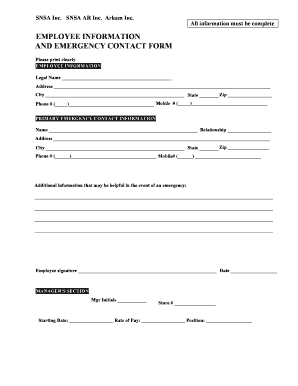
Get New Hire Emergency Contact Form
How it works
-

Open form follow the instructions
-

Easily sign the form with your finger
-

Send filled & signed form or save
How to fill out the New Hire Emergency Contact Form online
Filling out the New Hire Emergency Contact Form online is an essential step for ensuring your safety and communication during emergencies. This guide provides clear, step-by-step instructions to help you complete the form accurately and efficiently.
Follow the steps to complete the New Hire Emergency Contact Form
- Click ‘Get Form’ button to obtain the form and open it in the document editor.
- In the employee information section, clearly print your legal name as it appears on official documents. Ensure all details are correct.
- Enter your phone number and mobile number in the specified fields. Double-check for accuracy to facilitate communication.
- Move to the primary emergency contact information section. Fill in the name and relationship of your designated contact person.
- Provide the address of your primary emergency contact, including city, state, and zip code, using clear and legible handwriting.
- Input the phone number and mobile number for your primary emergency contact. Confirm these details are entered correctly.
- If applicable, write any additional information that may be beneficial in an emergency in the provided space. This may include medical conditions or specific requirements.
- Sign the form with your name and date it. Ensure your signature is clear and legible for verification purposes.
- Include your manager's initials, store number, starting date, and position in the manager's section, if required.
- Review the completed form for any errors or omissions before submitting. You can save changes, download, print, or share the form as needed.
Complete your New Hire Emergency Contact Form online and ensure your safety in case of emergencies.
The form should contain basic information such as the employee's name, address, and date of birth. Contact details are often included in case you need to get in touch with an employee in an emergency or other important situation.