Loading
Get Gfnbc
How it works
-

Open form follow the instructions
-

Easily sign the form with your finger
-

Send filled & signed form or save
How to fill out the Gfnbc online
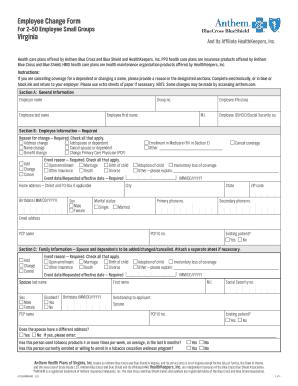
Filling out the Gfnbc form electronically is a straightforward process designed to facilitate employee change requests. This guide will walk you through each section of the form step-by-step to ensure you provide the necessary information accurately.
Follow the steps to complete the Gfnbc form online.
- Click 'Get Form' button to obtain the Gfnbc form and open it for completion.
- Section A: General Information. Enter the employer name and group number. Fill in the employee's last and first names.
- Section B: Employee Information – this section is required. Indicate the reason for the change by checking all applicable boxes, such as address change, adding a dependent, or name change.
- Provide the event reason by checking all that apply, including options like marriage or birth of a child. Fill in the event date/requested effective date, home address, and the employee's birthdate.
- Complete additional personal information including employee ID/Social Security number, Medicare enrollment status, marital status, primary and secondary phone numbers, email address, and primary care physician details.
- Section C: Family Information. Specify if you need to add, change, or cancel coverage for a spouse or dependents. Complete the required fields for each individual.
- Section E: Other Group Coverage. Answer questions regarding eligibility for Medicare or coverage under other health plans, providing necessary identifiers.
- In Section F: Terms, Conditions and Authorizations, read the disclaimer and sign the form electronically, affirming that all provided information is true and complete.
- Review all sections for accuracy. Once complete, you will have the option to save changes, download a copy, print it, or share the form as needed.
Complete your forms online today to ensure timely processing of your employee change requests.
Brian Emison has joined FNBC, the $740 million asset community bank headquartered in Ash Flat, as Senior Vice President of Operations and Chief Deposit Officer.