Loading
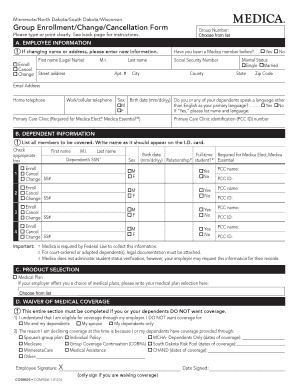
Get Group Enrollment/change/cancellation Form - Stearns County
How it works
-

Open form follow the instructions
-

Easily sign the form with your finger
-

Send filled & signed form or save
How to fill out the Group Enrollment/Change/Cancellation Form - Stearns County online
Completing the Group Enrollment/Change/Cancellation Form for Stearns County is essential for managing your health coverage. This guide provides a clear, step-by-step approach to filling out the form online, ensuring that you have all the necessary information at hand.
Follow the steps to successfully complete your form online:
- Press the ‘Get Form’ button to access the Group Enrollment/Change/Cancellation Form and open it in your chosen editing tool.
- Review the form carefully before beginning to fill it out. Ensure that you have any necessary personal documents to provide accurate information.
- Start with the ‘Group Number’ section; select your group number from the provided list.
- In section A, ‘Employee Information’, if you are changing your name or address, enter your new information. Fill in your legal first name, middle initial, and last name, along with street address, city, state, and zip code.
- Provide your marital status by checking the appropriate box, then input your email address and phone numbers.
- Indicate whether you have been a Medica member before by checking 'Yes' or 'No' and include your Social Security Number.
- In section B, ‘Dependent Information’, list all dependents to be covered and check the appropriate box for each one to enroll, cancel, or change their status.
- Complete section C, ‘Product Selection’, by writing down your chosen medical plan if applicable.
- If you or your dependents do not want coverage, fill out section D, ‘Waiver of Medical Coverage’, providing the necessary details.
- In section E, ‘Coordination of Benefits’, indicate if you or any family members have other insurance coverage and provide the required details.
- For Medicare information in section F, indicate if you, your spouse, or any dependents are covered. Attach copies of Medicare ID cards if applicable.
- Review the ‘Employee Authorization & Representation’ section in part G, sign, and date the form.
- Finally, complete the employer sections as required and ensure all information is accurate. Save changes, download the completed form, print if necessary, or share it as needed.
Complete your Group Enrollment/Change/Cancellation Form online today to ensure your coverage is properly managed.