Loading
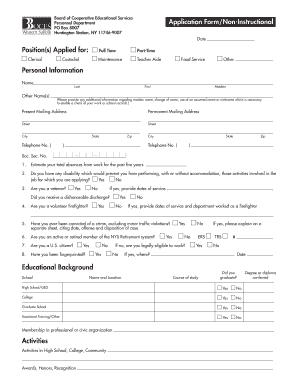
Get Application Form - Western Suffolk Boces
How it works
-

Open form follow the instructions
-

Easily sign the form with your finger
-

Send filled & signed form or save
How to fill out the Application Form - Western Suffolk Boces online
Filling out the Application Form for Western Suffolk Boces online can seem overwhelming, but with careful guidance, the process becomes straightforward. This comprehensive guide will walk you through each section of the form, ensuring you provide all the necessary information.
Follow the steps to complete the application form with ease.
- Press the ‘Get Form’ button to acquire the application form and open it in the designated editor.
- Begin by filling out your personal information section. Provide your full name, including last, first, and maiden names, if applicable. Include any other names you have used for verification purposes.
- Enter your present mailing address and permanent mailing address, ensuring that all details, such as street, city, state, and zip code, are accurate. Include valid telephone numbers for both addresses.
- In the personal background section, answer the questions regarding your social security number and provide details on your work absences over the past five years. Respond to inquiries about any disabilities, veteran status, and prior criminal convictions.
- Move on to the educational background. List schools attended, course of study, and graduation status for high school, college, and vocational training. Make sure to include any relevant memberships or activities.
- Detail your employment experience, starting with your most recent job. Include employers’ names and addresses, the duration of employment, job titles, and job descriptions. If necessary, use an additional sheet for more extensive work history.
- Provide information for any work-related references, ensuring that you include complete contact details. Authorize Western Suffolk BOCES to follow up with these references.
- Finally, review the form for accuracy, sign and date it to certify the truthfulness of the information provided. Make sure to save your changes, then download, print, or share the completed application form as needed.
Complete your application form online today to take the next step in your career.
Application Process Register for the TEAS with ATI Testing. Select Western Suffolk BOCES as the receiving institution. Contact the Health Careers Office at 631-271-3721 x220 to confirm that your results have been received. A score of 50% or higher is required in each section to continue the application process.
Industry-leading security and compliance
US Legal Forms protects your data by complying with industry-specific security standards.
-
In businnes since 199725+ years providing professional legal documents.
-
Accredited businessGuarantees that a business meets BBB accreditation standards in the US and Canada.
-
Secured by BraintreeValidated Level 1 PCI DSS compliant payment gateway that accepts most major credit and debit card brands from across the globe.