Loading
Get Level I Screen Form - Maine Assessing Services Agency
How it works
-

Open form follow the instructions
-

Easily sign the form with your finger
-

Send filled & signed form or save
How to fill out the Level I Screen Form - Maine Assessing Services Agency online
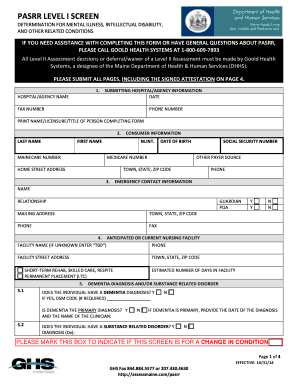
Filling out the Level I Screen Form for Maine Assessing Services Agency is an essential step in assessing the needs of individuals with mental illness, intellectual disability, and related conditions. This guide will provide you with clear, step-by-step instructions to ensure that you complete the form accurately and efficiently.
Follow the steps to successfully complete the Level I Screen Form
- Press the ‘Get Form’ button to obtain the form and open it in your editor.
- Provide the submitting hospital or agency information. Fill in the hospital or agency name, date, fax number, phone number, and the print name along with their licensure and title of the person completing the form.
- Next, fill in the consumer information section. Enter the last name, first name, MaineCare number, M.INT, date of birth, Medicare number, home street address, social security number, other payer source, and town, state, and ZIP code.
- Complete the emergency contact information. Include the name, relationship of the emergency contact, mailing address, town, state, ZIP code, and phone and fax numbers.
- Indicate the anticipated or current nursing facility, providing the facility name (if unknown, enter ‘TBD’), phone number, facility street address, town, state, and ZIP code. Specify if the individual is anticipated for short-term rehab, skilled care, respite, or permanent placement.
- Address the dementia diagnosis and/or substance-related disorder questions. Answer whether the individual has a dementia diagnosis, provide the DSM code if applicable, specify if dementia is the primary diagnosis, and note the clinician's name.
- Answer questions related to mental illness, specifying any past diagnoses or suspected conditions. Provide all required information including diagnosis codes and checkboxes as necessary.
- Complete the section on intellectual disability if applicable, detailing any past diagnoses, adaptive behavior impairments, and received services.
- Fill out the other related conditions section, answering questions regarding conditions such as cerebral palsy or epilepsy, ensuring recognition of any substantial functional limitations.
- Finally, sign the attestation. Confirm that you have spoken directly with the applicant and/or guardian while completing the form.
- Once all sections are completed, ensure you submit all pages, including the signed attestation, and follow the instructions for faxing the entire form to Goold Health Systems.
Get started on completing the Level I Screen Form online today.
Ascend is a national leader in providing conflict-free health care assessment services for state government agencies across the U.S. Ascend specializes in long-term care assessments for people with physical disabilities and complex medical conditions, and people with behavioral health, intellectual, and developmental ...
Industry-leading security and compliance
US Legal Forms protects your data by complying with industry-specific security standards.
-
In businnes since 199725+ years providing professional legal documents.
-
Accredited businessGuarantees that a business meets BBB accreditation standards in the US and Canada.
-
Secured by BraintreeValidated Level 1 PCI DSS compliant payment gateway that accepts most major credit and debit card brands from across the globe.