Loading
Form preview
  • US Legal Forms
  • Form Library
  • More Forms
  • More Uncategorized Forms
  • Mtm Level Of Need Form

Get Mtm Level Of Need Form

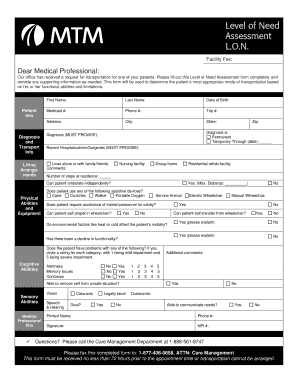
Level of Need Assessment L.O.N. Facility Fax: Dear Medical Professional: Our office has received a request for transportation for one of your patients. Please fill out this Level of Need Assessment.

How it works

  1. Open form

    Open form follow the instructions

  2. Easily sign form

    Easily sign the form with your finger

  3. Share form

    Send filled & signed form or save

How to fill out the Mtm Level Of Need Form online

Filling out the Mtm Level Of Need Form online is an essential process for ensuring that individuals receive the appropriate transportation based on their unique functional abilities. This guide provides a clear, step-by-step approach to help you complete the form accurately.

Follow the steps to effectively fill out the Mtm Level Of Need Form.

  1. Press the ‘Get Form’ button to access the Mtm Level Of Need Form and open it for editing.
  2. Begin by entering the patient's information in the 'Patient Info' section. This includes the patient's first name, last name, date of birth, Medicaid number, phone number, trip number, address, city, and state.
  3. In the 'Diagnosis and Transport Info' section, indicate whether the diagnosis is permanent or temporary, providing a specific end date if applicable. Fill in details about the diagnosis and any recent hospitalizations or surgeries.
  4. Provide living arrangement information by selecting whether the patient lives alone, with family or friends, in a nursing facility, group home, or residential rehab facility. Include any relevant comments and the number of steps at their residence.
  5. Assess the patient's physical abilities and equipment needs. Indicate if the patient uses assistive devices such as a cane, crutches, walker, or requires portable oxygen. State whether the patient needs assistance from trained personnel for safety and if they can self-propel in a wheelchair.
  6. Evaluate the patient's alertness, memory issues, and other cognitive abilities by marking the appropriate responses. Note any difficulties with vision and hearing in the designated sections.
  7. In the 'Medical Professional Info' section, provide your printed name, phone number, signature, and NPI number.
  8. Review the completed form for accuracy, ensuring all sections are filled in correctly with necessary comments. Save changes to the document.
  9. After confirming that the form is complete, download it for your records, print a copy for submission, or share it as needed. Remember to fax the completed form to the specified number at least 72 hours prior to the appointment.

Complete the Mtm Level Of Need Form online to ensure a smooth transportation process.

Get form

Experience a faster way to fill out and sign forms on the web. Access the most extensive library of templates available.
Get form

Related content

Requesting Non-emergency Medical Transportation...
This verification process is referred to as LON (Level of Need) certification. ... who...
Learn more
Medication Therapy Management (MTM) - UNM...
Jul 30, 2014 — Therapy Management (MTM) services as well by reporting these CPT ... to...
Learn more
Vertex MTM 24-Point Continuous Monitor - FCC...
normally open (form A). ... listed in Table C-1 varies based on the programmed alarm...
Learn more

Related links form

MFD-04. MFD-04 Dd Form 2929 Form 05 391 PA-1 AS (I) (03-08)

Get This Form Now!

Use professional pre-built templates to fill in and sign documents online faster. Get access to thousands of forms.
Get form
If you believe that this page should be taken down, please follow our DMCA take down processhere.
Get Mtm Level Of Need Form
Get form
  • Adoption
  • Bankruptcy
  • Contractors
  • Divorce
  • Home Sales
  • Employment
  • Identity Theft
  • Incorporation
  • Landlord Tenant
  • Living Trust
  • Name Change
  • Personal Planning
  • Small Business
  • Wills & Estates
  • Packages A-Z
  • Affidavits
  • Bankruptcy
  • Bill of Sale
  • Corporate - LLC
  • Divorce
  • Employment
  • Identity Theft
  • Internet Technology
  • Landlord Tenant
  • Living Wills
  • Name Change
  • Power of Attorney
  • Real Estate
  • Small Estates
  • Wills
  • All Forms
  • Forms A-Z
  • Form Library
  • Legal Hub
  • About Us
  • Help Portal
  • Legal Resources
  • Blog
  • Affiliates
  • Contact Us
  • Delete My Account
  • Site Map
  • Industries
  • Forms in Spanish
  • Localized Forms
  • State-specific Forms
  • Forms Kit
  • Real Estate Handbook
  • All Guides
  • Notarize
  • Incorporation services
  • For Consumers
  • For Small Business
  • For Attorneys
  • USLegal
  • FormsPass
  • pdfFiller
  • signNow
  • altaFlow
  • DocHub
  • Instapage
Form Packages
  • Adoption
  • Bankruptcy
  • Contractors
  • Divorce
  • Home Sales
  • Employment
  • Identity Theft
  • Incorporation
  • Landlord Tenant
  • Living Trust
  • Name Change
  • Personal Planning
  • Small Business
  • Wills & Estates
  • Packages A-Z
Form Categories
  • Affidavits
  • Bankruptcy
  • Bill of Sale
  • Corporate - LLC
  • Divorce
  • Employment
  • Identity Theft
  • Internet Technology
  • Landlord Tenant
  • Living Wills
  • Name Change
  • Power of Attorney
  • Real Estate
  • Small Estates
  • Wills
  • All Forms
  • Forms A-Z
  • Form Library
Customer Service
  • Legal Hub
  • About Us
  • Help Portal
  • Legal Resources
  • Blog
  • Affiliates
  • Contact Us
  • Delete My Account
  • Site Map
  • Industries
  • Forms in Spanish
  • Localized Forms
  • State-specific Forms
  • Forms Kit
Legal Guides
  • Real Estate Handbook
  • All Guides
Prepared for you
  • Notarize
  • Incorporation services
Our Customers
  • For Consumers
  • For Small Business
  • For Attorneys
Our Sites
  • USLegal
  • FormsPass
  • pdfFiller
  • signNow
  • altaFlow
  • DocHub
  • Instapage
Social Media
Call us now toll free:
+1 833 426 79 33
As seen in:
© Copyright 1999-2026 airSlate Legal Forms, Inc. 3720 Flowood Dr, Flowood, Mississippi 39232
  • Your Privacy Choices
  • Terms of Service
  • Privacy Notice
  • Content Takedown Policy
  • Bug Bounty Program