Loading
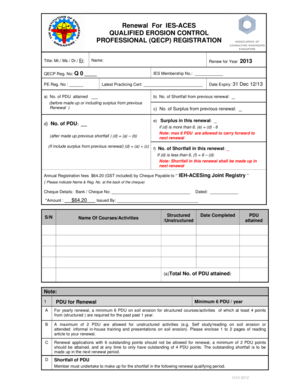
Get 2013 - Qecp Renewal Form (12 10 12).doc
How it works
-

Open form follow the instructions
-

Easily sign the form with your finger
-

Send filled & signed form or save
How to fill out the 2013 - QECP Renewal Form (12 10 12).doc online
This guide provides clear and detailed instructions for filling out the 2013 - QECP Renewal Form (12 10 12). It is designed to assist users in completing the form accurately and efficiently online, ensuring a smooth renewal process.
Follow the steps to fill out the form successfully.
- Click the ‘Get Form’ button to access the 2013 - QECP Renewal Form (12 10 12).doc and open it in your preferred online editor.
- In the 'Title' field, select the appropriate designation (Mr., Ms., Dr., Er.) that applies to you.
- Enter your QECP Registration Number in the designated field marked 'QECP Reg. No'.
- Fill in your name as you would like it to appear on your registration.
- Specify the year for which you are renewing your registration in the 'Renew for Year' field.
- Provide your PE Registration Number in the relevant section.
- Input the total number of Professional Development Units (PDU) attained in the designated space.
- Enter your IES Membership Number, if applicable.
- Provide details for your latest practicing certificate, including the expiry date.
- Calculate and input the number of shortfalls and surpluses from the previous renewal period based on the values provided in sections a), b), c), and d). Ensure that you follow the guidance regarding maximum carry forward of PDUs.
- State the Annual Registration Fees of $64.20 and provide cheque details, including bank and cheque number, in the corresponding fields.
- List the courses or activities you have completed in the designated section. Ensure to include whether they are structured or unstructured and the number of PDUs attained.
- Complete the contact details section with your designation, company name, postal address, phone numbers, and email addresses.
- After filling out the entire form, review all entries for accuracy before finalizing.
- You can then save your changes, download, print, or share the completed form as needed.
Complete your documents online to ensure your QECP membership remains active.
Industry-leading security and compliance
US Legal Forms protects your data by complying with industry-specific security standards.
-
In businnes since 199725+ years providing professional legal documents.
-
Accredited businessGuarantees that a business meets BBB accreditation standards in the US and Canada.
-
Secured by BraintreeValidated Level 1 PCI DSS compliant payment gateway that accepts most major credit and debit card brands from across the globe.