Loading
Get 7135566961
How it works
-

Open form follow the instructions
-

Easily sign the form with your finger
-

Send filled & signed form or save
How to fill out the 7135566961 online
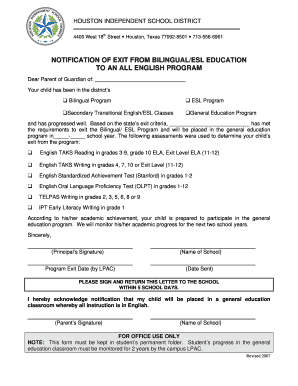
Filling out the 7135566961 form is an essential step for parents or guardians notifying the school of a student's exit from a bilingual or ESL program to an all English program. This guide provides a clear and supportive approach to completing the form accurately and efficiently online.
Follow the steps to complete the form successfully.
- Click the ‘Get Form’ button to access the form online and open it for editing.
- In the section labeled 'Dear Parent or Guardian of:', enter the name of the student who will be exiting the bilingual or ESL program.
- Indicate the current program the student has been enrolled in by selecting one of the options provided: Bilingual Program, ESL Program, Secondary Transitional English/ESL Classes, or General Education Program.
- In the blank space provided, fill in the student's name that has met the exit criteria.
- Complete the statement regarding the school year in which the transition will take place.
- List the assessments that were used to determine the student's readiness to exit the program. Be sure to check all applicable assessments.
- Review the statement confirming the student’s readiness for the general education program and that the school will monitor their academic progress for the next two school years.
- Sign the form in the designated area for the parent or guardian, acknowledging the notification.
- Fill in the name of the school and the date the notification letter is sent.
- Ensure that any remaining fields, including the principal's signature and program exit date, are completed.
- Save your changes, then download, print, or share the completed form as required.
Complete your documents online today to ensure a smooth transition for your child!