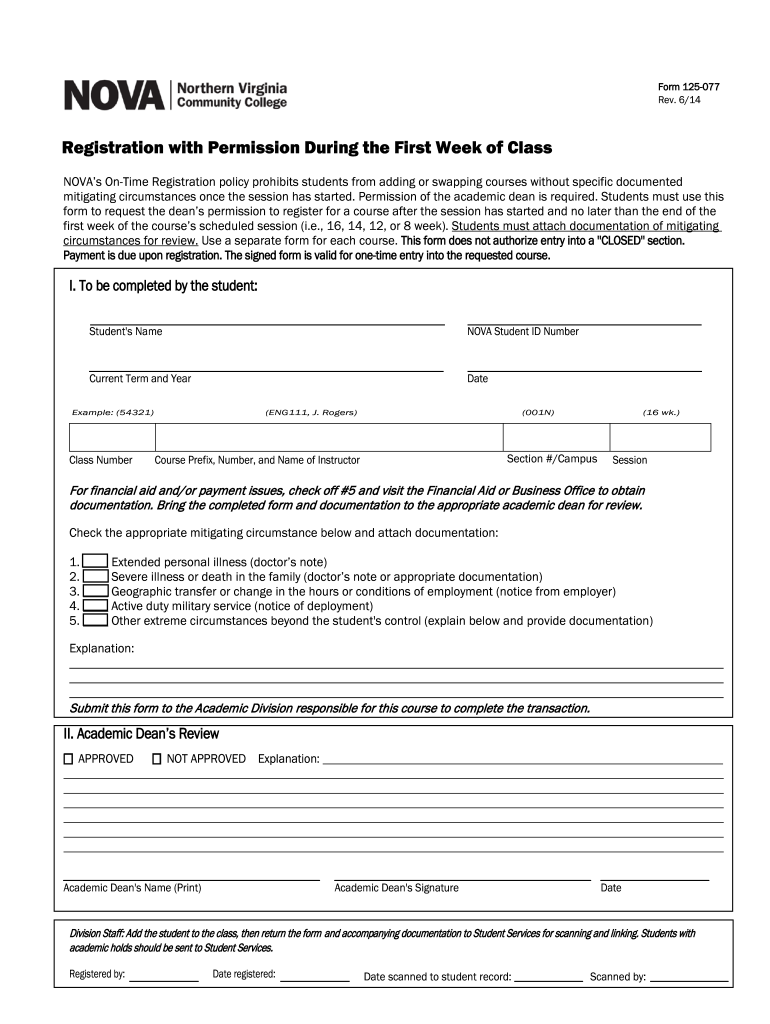
Form 125-077 Rev. 6/14 Registration with Permission During the First Week of Class NOVA s On-Time Registration policy prohibits students from adding or swapping courses without specific documented.
Loading

Open form follow the instructions

Easily sign the form with your finger

Send filled & signed form or save
How to fill out the Form 125-077 - Nvcc online
Form 125-077 is used to request permission to register for a course after the session has started at NOVA. This guide will walk you through the online process of filling out this form, ensuring you provide all necessary information and documentation.
Follow the steps to complete the Form 125-077 online.
- Press the ‘Get Form’ button to access the form and open it in your preferred editor.
- Enter your full name in the designated field labeled 'Student's Name'.
- Provide your NOVA student ID number in the corresponding box.
- Indicate the current term and year by selecting from the options provided.
- Fill in today's date, ensuring it's formatted correctly.
- Input the class number for the course you wish to register for (e.g., ENG111, J. Rogers).
- Specify the section number and campus where the course is held.
- Indicate the course prefix, number, and instructor's name, typically found in your course schedule.
- Select the session length (16, 14, 12, or 8 weeks) based on your course.
- If applicable, check off box #5 for financial aid or payment issues, and be prepared to visit the Financial Aid or Business Office to gather necessary documentation.
- Review the listed mitigating circumstances and check one that applies to your situation. Attach any required documentation, such as a doctor's note for illness.
- If your circumstance is 'Other,' provide a clear explanation in the designated space.
- Once complete, submit the form to the appropriate academic dean for review, along with all supporting documentation.
- After the academic dean has reviewed your request, check their approval status and any explanations provided.
- Ensure that the division staff processes your registration and follows up by returning the form and any attachments to Student Services for proper documentation.
Begin filling out your Form 125-077 online today to ensure timely submission.
Experience a faster way to fill out and sign forms on the web. Access the most extensive library of templates available.
Related content
ED 125 077. TITLE. INSTITUTION ... and particular art form, is staging still another...
Number, Form Name, Format. 125-076, "I" Grade Assignment Form, PDF. 105-045, Access...
computer language, in any form or by any means ... features; audio, video, text, graphics...
Get answers to your most pressing questions about US Legal Forms API.
How do I send my Nvcc transcripts?
Students can order an Official Transcript (by mail method) and send it directly to Virginia State Board of Nursing, ATTN: Nursing Board, Perimeter Center, 9960 Mayland Drive, Suite 300, Richmond, VA 23233.
How do I contact Nvcc registrar?
Call NOVA's Call Center at 703.323. 3000.
How to request transcripts from Naugatuck Valley Community College?
Email records@nv.edu, walk-in to the Records Office in Kinney Hall Room 516, or FAX to 203-575-8085.
How do I send my community college transcripts to common app?
Log in to your Common App account. Click My Application, and then click Colleges Attended. 2. Next to each college/program you have selected, you will see a notation about transcripts and a link to order transcripts.
How do I transfer credit to Nvcc?
An official transcript must be sent electronically, by mail, or directly from the sending college or university. Grades earned must be equivalent to a "C" grade or better. The transcript must list a grade and credit earned. Student must complete and submit the Transfer Credit Evaluation Request Form #125-049E.
Where to send transcripts to Northern Virginia Community College?
Paper transcripts can be mailed to Northern Virginia Community College, College Records Office -FX- P3, 3924 Pender Dr. Fairfax, VA 22030.
What is Nvcc federal code?
NVCC's Federal School Code is 003727.
How to register classes in Northern Virginia Community College?
Registration Visit the Schedule of Classes. Search for a class and select the class #. To enroll in credit classes at NOVA, use our Student Information System (SIS). Visit NOVAConnect , our SIS support page, for step-by-step tutorials. To access SIS, log in to myNOVA. ... Easy Steps to Registration. Find a NOVA Online Class.
Use professional pre-built templates to fill in and sign documents online faster. Get access to thousands of forms.
If you believe that this page should be taken down, please follow our DMCA take down process here.