Loading
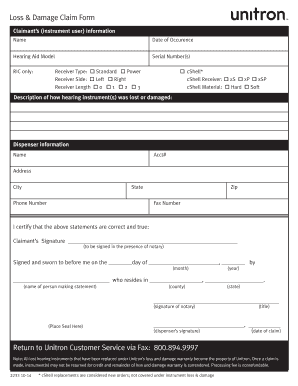
Get Unitron Loss And Damage Form
How it works
-

Open form follow the instructions
-

Easily sign the form with your finger
-

Send filled & signed form or save
How to fill out the Unitron Loss And Damage Form online
Filing a loss and damage claim for your hearing instrument can be a straightforward process. This guide provides clear instructions to help you complete the Unitron Loss And Damage Form online efficiently.
Follow the steps to successfully complete the form.
- Press the ‘Get Form’ button to access the Unitron Loss And Damage Form. This will open the form in an editor for your convenience.
- Begin by filling in the claimant's information. Enter your full name in the designated field, followed by the date of occurrence of the loss or damage.
- Next, provide details about your hearing aid. Enter the model name and the serial number(s) of your device.
- Indicate the type of receiver used by selecting either 'Standard' or 'Power'. Then, specify the side of the receiver by selecting 'Left' or 'Right'.
- If applicable, fill out the receiver length option by choosing '0', '1', '2', or '3'. For RIC (Receiver in Canal) only, select the cShell type and material accordingly.
- Provide a detailed description of how the hearing instrument was lost or damaged, ensuring you explain the circumstances clearly.
- Fill in the dispenser's information, including the dispenser’s name, account number, address, city, state, phone number, zip code, and fax number.
- Review the certification statement asserting that the provided information is correct. You will need to sign this statement in the presence of a notary.
- Once completed, save your changes to ensure all your entries are captured. You have the option to download, print, or share the filled form as needed.
- Finally, return the completed form to Unitron Customer Service via fax at 800.894.9997.
Complete your Unitron Loss And Damage Form online today for a smooth claims process.
Get form
Experience a faster way to fill out and sign forms on the web. Access the most extensive library of templates available.
Get This Form Now!
Use professional pre-built templates to fill in and sign documents online faster. Get access to thousands of forms.