Loading
Get Mhnet Provider Enrollment
How it works
-

Open form follow the instructions
-

Easily sign the form with your finger
-

Send filled & signed form or save
How to fill out the Mhnet Provider Enrollment online
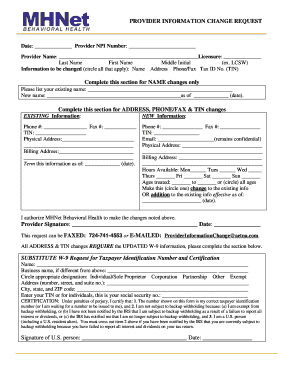
Completing the Mhnet Provider Enrollment form is an essential step for providers looking to update their information. This guide will walk you through each section of the form, ensuring you have all the necessary information for a smooth and efficient submission.
Follow the steps to complete your Mhnet Provider Enrollment form.
- Press the ‘Get Form’ button to access the online version of the Mhnet Provider Enrollment form.
- Start by entering the date and your Provider NPI number at the top of the form. This ensures that your submission is associated with your specific profile.
- Fill in your provider name as well as your licensure details. Be precise in spelling to avoid any processing delays.
- Indicate any changes by circling the options that apply: Name, Address, Phone/Fax, or Tax ID Number (TIN). This helps clarify what information needs updating.
- If you are changing your name, complete the section dedicated to name changes with your existing name and the new name you are adopting, along with the effective date.
- For changes involving address, phone/fax, or TIN, fill in both the existing and new information in the provided fields. Ensure accuracy, especially for contact details.
- Specify the effective date of the changes. Providing a date helps to establish when the new information should be recognized.
- Complete the hours available section by marking the days you are available and any age range that you treat, selecting all that are relevant.
- If you are providing updated information, choose whether this is a change or an addition to existing information. Document the effective date.
- Sign and date the form in the provided space to authorize MHNet Behavioral Health to process your requested changes.
- Make sure to include an updated W-9 form if you are changing your address or TIN. Fill in the required information on the Substitute W-9 Request section accurately.
- Once completed, you can either save the changes, download a copy for your records, print the form, or share it as necessary.
Complete your Mhnet Provider Enrollment form online today to ensure your information is current.
(MHN) is a subsidiary of Health Net, LLC. The MHN family of companies includes Managed Health Network, MHN Services and MHN Government Services. Health Net and Managed Health Network are registered service marks of Health Net, LLC. or its affiliates.