Loading
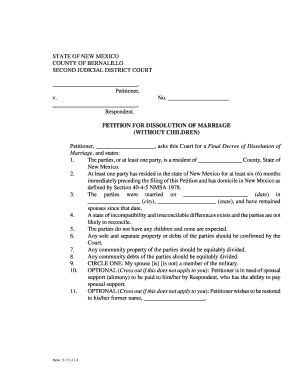
Get 4a-102 Petition For Dissolution Of Marriage (without Children)
How it works
-

Open form follow the instructions
-

Easily sign the form with your finger
-

Send filled & signed form or save
How to fill out the 4A-102 Petition For Dissolution Of Marriage (without Children) online
Filling out the 4A-102 Petition For Dissolution Of Marriage (without Children) online can seem daunting, but this guide will provide you with clear and step-by-step instructions to help you through the process. By understanding each section of the form, you can successfully complete your petition with confidence.
Follow the steps to complete your petition accurately.
- Click ‘Get Form’ button to access the petition document and open it in your editor.
- Begin by filling in the names of the petitioner and respondent at the top of the form. Ensure the names are spelled correctly and formatted as required.
- Provide the case number in the designated space. If you do not have one, leave it blank or check with the court for guidance.
- In the first numbered section, indicate the county where at least one party resides by completing the blank space with the appropriate county name.
- For the second section, state the length of residence in New Mexico for at least one party by summarizing how long they have lived in the state.
- Enter the marriage date, city, and state where the marriage took place in the third numbered section.
- In section four, acknowledge the existence of irreconcilable differences between the parties as the grounds for dissolution.
- Confirm in section five that there are no children involved in the marriage.
- In section six to eight, provide details regarding any separate and community property and debts that need to be addressed.
- For section nine, indicate whether the spouse is a member of the military by circling the appropriate option.
- If applicable, for section ten, state whether spousal support is being requested by crossing out the option that does not apply.
- For section eleven, if you wish to restore your former name, write it in the provided space, or cross out the section if it doesn’t apply.
- In the concluding part of the petition, review and ensure your name, address, and contact information are accurate.
- Finally, verify the petition in the allotted space, including signing the document. A notary public will need to witness this part.
- Once all sections are filled out, save your changes. You may also download, print, or share the form as necessary.
Start completing your documents online today for a smoother process.
To qualify for a simplified dissolution, a couple must agree to an uncontested divorce settlement and must not share minor children. Additionally, alimony cannot be awarded in these cases. A Regular Dissolution of Marriage: A regular dissolution is a more traditional divorce.
Industry-leading security and compliance
US Legal Forms protects your data by complying with industry-specific security standards.
-
In businnes since 199725+ years providing professional legal documents.
-
Accredited businessGuarantees that a business meets BBB accreditation standards in the US and Canada.
-
Secured by BraintreeValidated Level 1 PCI DSS compliant payment gateway that accepts most major credit and debit card brands from across the globe.