Loading
Get C-12133-emp_1-6.indd. How To - Sisc Kern
How it works
-

Open form follow the instructions
-

Easily sign the form with your finger
-

Send filled & signed form or save
How to use or fill out the C-12133-EMP_1-6.indd. How To - Sisc Kern online
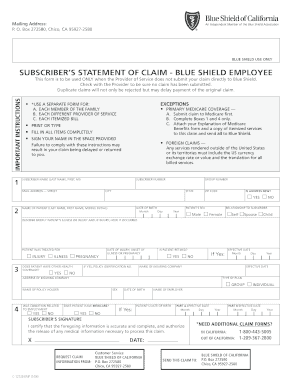
This guide provides clear and detailed instructions on how to accurately fill out the C-12133-EMP_1-6.indd. How To - Sisc Kern form. Following these steps will ensure your claim is processed efficiently and without unnecessary delays.
Follow the steps to successfully complete the form.
- Click the ‘Get Form’ button to access the form and open it in an editor of your choice.
- Begin by filling in the subscriber’s name, ensuring to include the last name, first name, and middle initial. This information is crucial for identification.
- Enter the subscriber number, which is typically found on your Blue Shield identification card.
- Provide your complete mailing address, including street, city, state, and ZIP code. If your address has changed, indicate that by marking the appropriate box.
- Fill in the date of birth for the subscriber using the specified format: month, day, and year.
- Enter the patient’s name, including last name, first name, and middle initial. This section is vital for linking the claim to the person receiving treatment.
- Specify the patient's sex by selecting either male or female.
- Indicate the relationship of the patient to the subscriber by choosing from options such as self, spouse, or child.
- Briefly describe the patient's illness or injury, including details on how the injury occurred if applicable.
- Select whether the patient has any other health coverage by marking 'Yes' or 'No' and fill in the identification number if applicable.
- If the patient is retired, select 'Yes' and complete the effective date and the name of the insuring company.
- Answer whether the condition was related to employment by checking 'Yes' or 'No'.
- Indicate if the patient has Medicare coverage and provide the effective dates for Parts A and B if applicable.
- Review the form for completeness. Ensure all sections are filled out correctly and legibly. Finally, sign and date the form in the space provided to authorize the claim submission.
- After ensuring all information is correct, choose to save any changes, download, print, or share the form as needed for submission.
Complete your claim form online today for fast and efficient processing.
SISC-III (SELF-INSURED SCHOOLS OF CALIFORNIA) MEDICAL, DENTAL AND VISION SYSTEM.
Industry-leading security and compliance
US Legal Forms protects your data by complying with industry-specific security standards.
-
In businnes since 199725+ years providing professional legal documents.
-
Accredited businessGuarantees that a business meets BBB accreditation standards in the US and Canada.
-
Secured by BraintreeValidated Level 1 PCI DSS compliant payment gateway that accepts most major credit and debit card brands from across the globe.