Loading
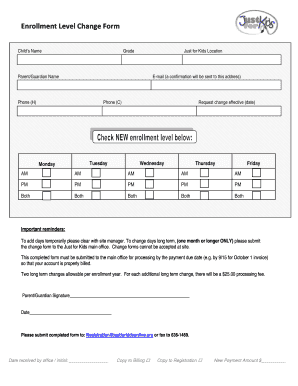
Get Enrollment Level Change Form - Just For Kids
How it works
-

Open form follow the instructions
-

Easily sign the form with your finger
-

Send filled & signed form or save
How to fill out the Enrollment Level Change Form - Just For Kids online
Filling out the Enrollment Level Change Form - Just For Kids is an essential step for users looking to modify their child's enrollment status. This guide provides clear, step-by-step instructions to ensure a smooth and efficient process.
Follow the steps to successfully complete the form online.
- Click the ‘Get Form’ button to obtain the Enrollment Level Change Form - Just For Kids and open it for editing.
- Begin by entering the child's name in the designated field. Ensure that the spelling is correct for proper identification.
- Next, fill in the child's current grade entering it accurately in the respective section.
- Specify the location for Just for Kids that your child is enrolled in. This helps in processing the request accurately.
- Complete the parent/guardian name field with the full name of the primary contact for the child.
- Provide a valid email address where confirmation regarding the changes will be sent. Ensure that the email is correct to receive timely updates.
- Fill in the home phone number (H) in the appropriate space followed by a cell phone number (C) for additional contact.
- Indicate the effective date for the requested change by selecting the appropriate day from the options provided. Make sure to follow the important reminders regarding approval.
- Choose the days and times (AM/PM) that the change will take effect. Remember to clear temporary changes with the site manager beforehand.
- If requesting a long-term change, ensure that the form is submitted to the main office along with any required processing fees. Two long-term changes are allowed per enrollment year.
- Sign and date the form where indicated. This signature confirms your request and affirms the information provided is accurate.
- Submit the completed form either via email to Registration@justforkidsonline.org or by fax to 636-1469. Keep a copy of the submitted document for your records.
Submit the Enrollment Level Change Form online today to ensure your modifications are processed promptly.
Industry-leading security and compliance
US Legal Forms protects your data by complying with industry-specific security standards.
-
In businnes since 199725+ years providing professional legal documents.
-
Accredited businessGuarantees that a business meets BBB accreditation standards in the US and Canada.
-
Secured by BraintreeValidated Level 1 PCI DSS compliant payment gateway that accepts most major credit and debit card brands from across the globe.