Loading
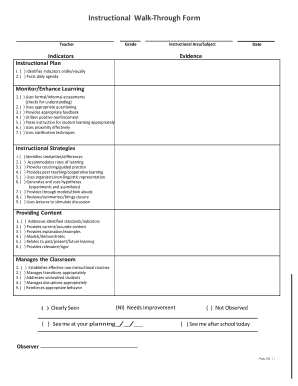
Get Instructional Walk-through Form - Eoc Sc
How it works
-

Open form follow the instructions
-

Easily sign the form with your finger
-

Send filled & signed form or save
How to fill out the Instructional Walk-Through Form - Eoc Sc online
This guide provides clear and systematic steps for completing the Instructional Walk-Through Form - Eoc Sc online. By following these instructions, you will be able to accurately fill out each section to document instructional strategies and classroom management effectively.
Follow the steps to successfully complete the form.
- Press the ‘Get Form’ button to access the Instructional Walk-Through Form - Eoc Sc and open it in the editor.
- Begin by filling in the teacher's name and the grade level in the designated fields. Ensure this information is accurate to reflect the correct instructional context.
- Next, indicate the instructional area or subject that the observation pertains to. This should match the content area being taught.
- Enter the date of the observation in the appropriate field. This date will serve as a reference for when the instructional walk-through took place.
- In the 'Evidence' section, provide observable details that support the instructional practices highlighted. This will help articulate the overall effectiveness of the instruction.
Complete the Instructional Walk-Through Form - Eoc Sc online today to enhance your instructional planning.
The EOCEP for Algebra 1 is untimed and is composed of fifty test items.