Loading
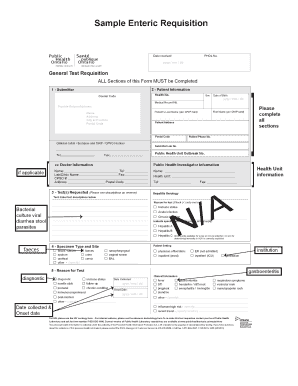
Get New General Test Requisition Form V9 Draft
How it works
-

Open form follow the instructions
-

Easily sign the form with your finger
-

Send filled & signed form or save
How to use or fill out the NEW General Test Requisition Form V9 Draft online
This guide provides a clear and detailed approach to filling out the NEW General Test Requisition Form V9 Draft online. By following these instructions, users can ensure that all necessary information is accurately submitted to facilitate laboratory testing.
Follow the steps to successfully complete the form online.
- Click ‘Get Form’ button to obtain the form and open it in the editor.
- Begin with the submitter information section. Enter your health number, courier code, and date of birth in the specified format (yyyy/mm/dd). Include the submitter's lab number and public health unit outbreak number if applicable.
- Complete the patient information section. Fill in the patient's first and last name as they appear on the OHIP card, health number, address, postal code, and phone number. Provide the clinician's initials, surname, and CPSO number where required.
- In the 'cc Doctor Information' section, enter the details of the doctor including their name, lab/clinic name, CPSO number, and address.
- Specify the test(s) requested by entering descriptions in the provided fields. Indicate the health unit and select a reason for the test with a checkmark, choosing only one box.
- Identify the specimen type and site. Select the appropriate options from the list (e.g., blood/serum, stool) and indicate the patient setting where the specimen was collected (e.g., physician office/clinic, ER).
- Enter the reason for the test. Choose from options provided, and specify other conditions as necessary.
- Fill out the date collected and onset date fields using the format (yyyy/mm/dd).
- Provide any relevant clinical information related to the patient, as requested in the section.
- After completing all sections, review the form for accuracy. You can save changes, download, print, or share the form as necessary.
Complete your documents online quickly and efficiently by following these steps.
Purchase requisitions are a document used when an employee needs to make a purchase or an order request on behalf of their company. It is a document that is used to inform department managers or the purchasing officer of the decision so that the purchasing department can start the purchasing process.