Loading
Get San Jose City College Transcript
How it works
-

Open form follow the instructions
-

Easily sign the form with your finger
-

Send filled & signed form or save
How to fill out the San Jose City College Transcript online
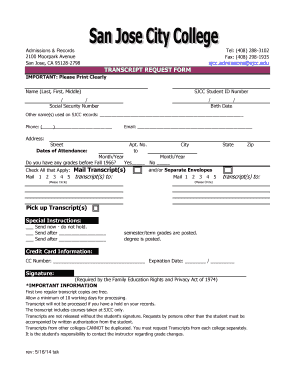
Filling out the San Jose City College Transcript request form can be straightforward with the right guidance. This guide offers step-by-step instructions to help you navigate the form efficiently and ensure your request is completed accurately.
Follow the steps to successfully complete your transcript request
- Press the ‘Get Form’ button to access the transcript request form and open it in your preferred document editor.
- In the form, begin by entering your name clearly in the specified fields for last, first, and middle name.
- Next, provide your San Jose City College student ID number or, if applicable, your social security number. Remember to write this information accurately.
- Indicate your birth date in the designated format to confirm your identity.
- If you have any other names used in SJCC records, list them in the section provided.
- Enter your current phone number and email address to ensure additional communication regarding your transcript request.
- Fill in your address information, including street, apartment number (if applicable), city, state, and zip code.
- Specify the dates of your attendance at San Jose City College, including the month and year for both start and end dates.
- Indicate whether you have any grades from before Fall 1966 by checking 'Yes' or 'No'.
- Select the mailing preferences for your transcript. Specify how many transcripts you would like to mail and to whom, specifying separate envelopes if necessary.
- Choose your preferred method for receiving transcripts: mail or pick up, and provide any special instructions if applicable.
- Input your credit card information, including the number and expiration date, for payment if necessary.
- Finally, sign the form, as your signature is a requirement for processing under the Family Education Rights and Privacy Act of 1974.
- After ensuring all fields are accurately filled, you can save your changes, download, print, or share the completed form as needed.
Complete your transcript request online today to ensure timely processing of your academic records.
Current students login your MySJSU Portal to place an order. Here's where to find the "Order Official Transcripts" link in your portal. Former students no longer have access to their MySJSU after 12 months and must order from Parchment, our vendor. You do not need your SJSU ID number to place an order.