Loading
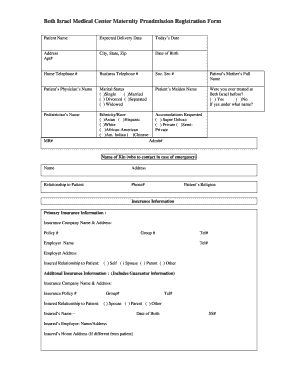
Get Maternity Preadmission Registration Form - Beth Israel Ob-gyn
How it works
-

Open form follow the instructions
-

Easily sign the form with your finger
-

Send filled & signed form or save
How to fill out the Maternity Preadmission Registration Form - Beth Israel OB-GYN online
This guide is designed to assist you in completing the Maternity Preadmission Registration Form for Beth Israel OB-GYN online. By following the steps outlined below, you will ensure that all necessary information is accurately provided to facilitate your preadmission process.
Follow the steps to effectively complete the Maternity Preadmission Registration Form.
- Use the ‘Get Form’ button to access the Maternity Preadmission Registration Form. This action opens the document for you to start entering your information.
- Fill in your personal details accurately. Start with your patient name, expected delivery date, and today's date. Ensure that your address, apartment number, city, state, and zip code are correctly stated.
- Provide the date of birth, home telephone number, business telephone number, and social security number to complete your identification.
- Input your mother's full name and the name of your physician. Select your marital status from the given options: single, married, divorced, separated, or widowed.
- If applicable, enter your maiden name and indicate whether you have been treated at Beth Israel in the past. If yes, specify the name under which you were treated.
- List your pediatrician's name and select your ethnicity/race from the provided categories.
- Select the type of accommodation you prefer: super deluxe, private, or semi-private.
- Fill out the emergency contact information, including the name, address, relationship to you, and phone number of the contact person.
- Indicate your religion and complete the primary insurance information section, including the insurance company name, address, policy number, group number, and contact phone number.
- Provide your employer's name, contact number, and address. Specify your relationship to the insured party using the given options.
- If applicable, provide additional insurance information by repeating the necessary steps, including the insured's name and employer details.
- After completing the form, review all entered information for accuracy. You can save changes, download, or print the form as needed.
Complete your Maternity Preadmission Registration Form online to ensure a smooth preadmission process.
These are some midwives with a large number of reviews in Boston, MA: Massachusetts General Hospital (300 reviews) Lahey Hospital & Medical Center (274 reviews) Beth Israel Deaconess Medical Center (234 reviews)
Industry-leading security and compliance
US Legal Forms protects your data by complying with industry-specific security standards.
-
In businnes since 199725+ years providing professional legal documents.
-
Accredited businessGuarantees that a business meets BBB accreditation standards in the US and Canada.
-
Secured by BraintreeValidated Level 1 PCI DSS compliant payment gateway that accepts most major credit and debit card brands from across the globe.