Loading
Get Crr026
How it works
-

Open form follow the instructions
-

Easily sign the form with your finger
-

Send filled & signed form or save
How to fill out the Crr026 online
Filling out the Crr026 form online can seem daunting, but with the right guidance, you can complete it accurately and efficiently. This guide will walk you through each section of the form to ensure your submission is successful.
Follow the steps to complete the Crr026 form online.
- Use the ‘Get Form’ button to acquire the Crr026 form and open it in your preferred online browser.
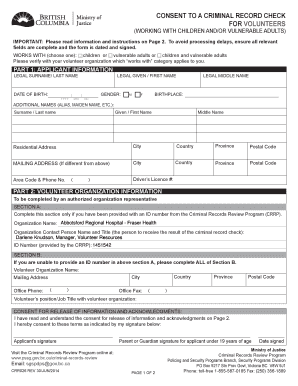
- Begin by selecting your volunteer organization’s specific category of work, choosing from children, vulnerable adults, or both.
- In Part 1, complete the applicant information with your legal surname, given names, and date of birth. Make sure to include your gender and birthplace.
- If you have any additional names, such as an alias or maiden name, list them in the provided section.
- Fill out your residential address, including city, country, province, and postal code. If your mailing address is different, provide that information as well.
- Enter your contact information, including area code and phone number, as well as your driver’s license number if applicable.
- In Part 2, your volunteer organization will provide their details. If an ID number is provided by the Criminal Records Review Program, complete Section A; otherwise, complete all of Section B.
- Confirm your understanding of the consent for release of information by signing the form. If you are under 19 years of age, a parent or guardian must also sign.
- Ensure that the form is dated and all relevant fields are complete to avoid any processing delays.
- Once all sections are filled out, save the completed form, and either download, print, or share it as required by your organization.
Completing your documents online is now easier than ever. Start filling out your Crr026 form today!
Cautions for non-specified offences that are more than six years old will no longer show on your DBS certificate. Convictions for non-specified offences, received when over the age of 18, which did not result in a custodial sentence and which are more than 11 years old will not show on your DBS certificate.
Industry-leading security and compliance
US Legal Forms protects your data by complying with industry-specific security standards.
-
In businnes since 199725+ years providing professional legal documents.
-
Accredited businessGuarantees that a business meets BBB accreditation standards in the US and Canada.
-
Secured by BraintreeValidated Level 1 PCI DSS compliant payment gateway that accepts most major credit and debit card brands from across the globe.