Loading
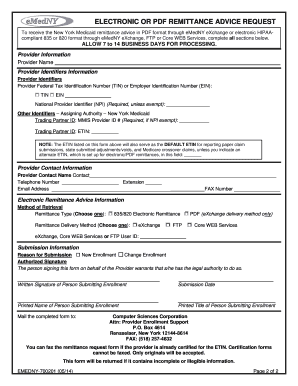
Get Electronic Or Pdf Remittance Advice Request Form - Emedny
How it works
-

Open form follow the instructions
-

Easily sign the form with your finger
-

Send filled & signed form or save
How to fill out the Electronic Or PDF Remittance Advice Request Form - EMedNY online
This guide provides a comprehensive overview of how to correctly fill out the Electronic Or PDF Remittance Advice Request Form - EMedNY online. Following the detailed steps will ensure successful submission and processing of your request.
Follow the steps to complete the form effectively.
- Click the ‘Get Form’ button to obtain the form and open it in the editor.
- Begin by entering the provider name, which can be either the individual provider's name or the organization's name for whom this form is being submitted.
- Provide the Federal Tax Identification Number, which can be either the Federal Employer Identification Number (EIN) or the provider's Social Security Number (TIN).
- Enter the National Provider Identifier (NPI), which is required unless exempt.
- For atypical providers, input the MMIS Provider ID. Enter the Electronic Transmitter Identification Number (ETIN), ensuring only one ETIN is submitted per form.
- Complete the provider contact information, including the name, phone number, and email address of the person to be contacted regarding this form.
- Select one remittance type for the provider. Only one remittance type is permitted per ETIN/Provider combination.
- Choose one remittance delivery method for the provider, noting that only one is allowed per ETIN/Provider combination.
- Enter the user ID associated with your preferred remittance delivery method, ensuring it is valid and active.
- Indicate the reason for submission by checking the appropriate box if there is a change to enrollment.
- Obtain the authorized signature required for submission. This must be signed by the practitioner or the authorized representative for groups or institutions.
- Once all sections are complete, save your changes, download or print the form, and follow the mailing instructions or fax it to the designated number.
Complete your remittance request form online today to ensure timely processing.
You may apply for Medicaid in the following ways: Through NY State of Health: The Official Health Plan Marketplace. Through a Managed Care Organization (MCO) Call the Medicaid Helpline (800) 541-2831. Through your Local Department of Social Services Office.