Loading
Get Mainpro Ethical Review Form - The College Of Family Physicians ... - Cfpc
How it works
-

Open form follow the instructions
-

Easily sign the form with your finger
-

Send filled & signed form or save
How to fill out the Mainpro Ethical Review Form - The College Of Family Physicians online
Completing the Mainpro Ethical Review Form is essential for any upcoming accredited Continuing Medical Education (CME) program session. This guide provides a clear, step-by-step process to assist users in filling out the form accurately and submitting it efficiently online.
Follow the steps to complete the Mainpro Ethical Review Form online.
- Press the ‘Get Form’ button to retrieve the Mainpro Ethical Review Form and open it in your preferred document editing tool.
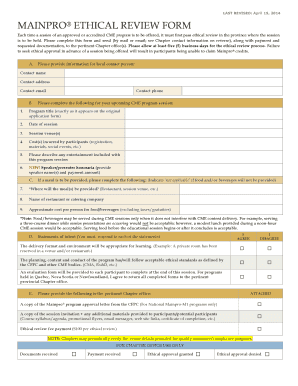
- Provide the local contact person's information. Fill in fields for their name, address, email, and phone number.
- Input the details for your upcoming CME program session. Include the program title, date of the session, session venues, and any costs incurred by participants, such as registration or materials.
- If applicable, describe any entertainment that will be included in the program session.
- For honoraria, list the speaker's name(s) and the payment amount to be provided.
- If meals are provided, specify where they will be served, name the restaurant or catering service, and indicate the approximate cost per person for food and beverages.
- Respond to the statements of intent by selecting ‘I AGREE’ or ‘I DISAGREE’ based on program standards and intentions for participant evaluations.
- Attach required documents to the form, including the Mainpro program approval letter, session invitation, additional materials provided to participants, and the ethical review fee payment.
- Review all entered information for completeness and accuracy before submission.
- Save the changes made to the form, and choose to download, print, or share the completed document as needed.
Start filling out the Mainpro Ethical Review Form online today for your CME program!
You can earn AAPA Category 1 CME credit while you use UpToDate. The number of credits awarded depends on how much you use the program. UpToDate logs and calculates the credits you earn, and you can process them at any time during your subscription at no additional cost.
Industry-leading security and compliance
US Legal Forms protects your data by complying with industry-specific security standards.
-
In businnes since 199725+ years providing professional legal documents.
-
Accredited businessGuarantees that a business meets BBB accreditation standards in the US and Canada.
-
Secured by BraintreeValidated Level 1 PCI DSS compliant payment gateway that accepts most major credit and debit card brands from across the globe.